The clock reads 2:14 AM. Riya’s four-year-old is burning up on her shoulder, a strange rash blooming across his arms. Her phone glows in the dark, thumb hovering over the search bar. ER?
A forty-minute drive. Wait until morning? What if morning is too late?
This gut-tightening moment is exactly what an entire industry has built itself around solving.
Hospitals, telehealth startups, and insurers investing in AI symptom checker mobile app development are trying to be the calm voice in someone’s worst 2 AM.
If you’re wondering how to build an AI symptom checker mobile app that earns a parent’s trust in a moment like this, this guide covers the features, technology, cost, and compliance- no jargon, just what you need to know.
What Is an AI Symptom Checker Mobile App? A Simple Definition
Think of it as a digital triage nurse that never sleeps. A user types or speaks their symptoms, “sharp pain in my lower right belly, mild fever,” and the mobile app, powered by AI digital health technologies, analyzes the input, asks smart follow-up questions, and gives a clear recommendation: self-care, book a doctor’s visit, or go to the ER.
It doesn’t replace doctors; it replaces the confusion that happens before people reach one.
That’s the entire value proposition behind every serious healthcare AI mobile app development guide: reducing unnecessary ER visits and giving people confidence in a moment of uncertainty.
How Does an AI Symptom Checker Mobile App Work?
Let’s continue Riya’s story. She opens the mobile app and types her son’s symptoms into a chat window. Behind the scenes, the mobile app moves through six simple stages before it ever gives her an answer.
Here’s the flow, visualized:
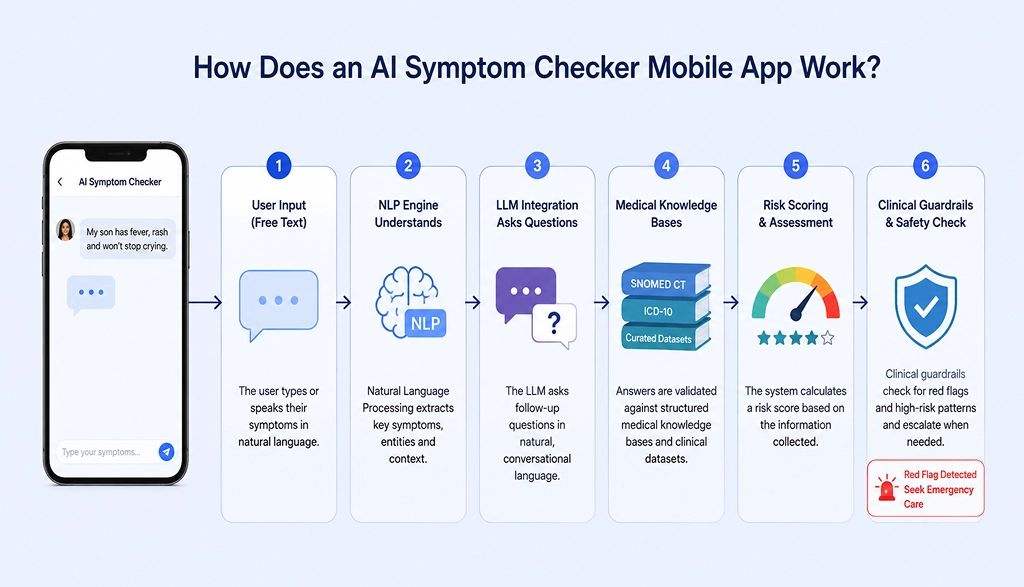
In plain terms: her free-text description (“fever, rash, won’t stop crying”) is read by an NLP engine, which hands the conversation to an LLM integration layer that asks natural follow-up questions the way a nurse would: “Is the rash raised or flat? Any recent vaccinations?”
Every answer is then checked against structured medical knowledge bases (SNOMED CT, ICD-10 codes, curated symptom-disease datasets) rather than the open internet, so the guidance stays clinically grounded.
The AI then calculates a risk score, and finally, clinical guardrails- hard-coded safety rules, check for red-flag combinations like “high fever plus stiff neck” and instantly escalate to “seek emergency care,” no matter what the AI’s confidence score says.
This blend of conversational AI and rule-based safety nets is exactly what separates a trustworthy product from a risky one, and it’s central to any serious AI symptom checker mobile app development project.
If you’re exploring adherence tools alongside diagnostic ones, our medication reminder mobile app development guide breaks down the features, AI capabilities, and cost involved.
Quick Look: AI Techniques Used in Symptom Checkers
| AI Component | What It Does | Example Use |
|---|---|---|
| NLP Engine | Understands free-text symptom descriptions | “My chest feels tight” → identifies chest pain |
| LLM (Large Language Model) | Holds natural, human-like follow-up conversations | Asking clarifying questions dynamically |
| Medical Knowledge Base | Maps symptoms to conditions using verified data | Cross-checking against ICD-10/SNOMED CT |
| Triage/Risk Engine | Scores urgency and suggests next steps | Self-care vs. doctor visit vs. ER |
| Clinical Guardrails | Enforces safety rules regardless of AI confidence | Auto-escalating red-flag symptoms |
AI Symptom Checker App Market Size and Growth Trends
Riya isn’t alone. Millions of people every night are Googling symptoms, often landing on unreliable or frightening information.
An AI triage mobile app for healthcare systems solves this on both sides: hospitals reduce ER load, and patients get instant, trustworthy guidance. The growth curve makes the opportunity clear:
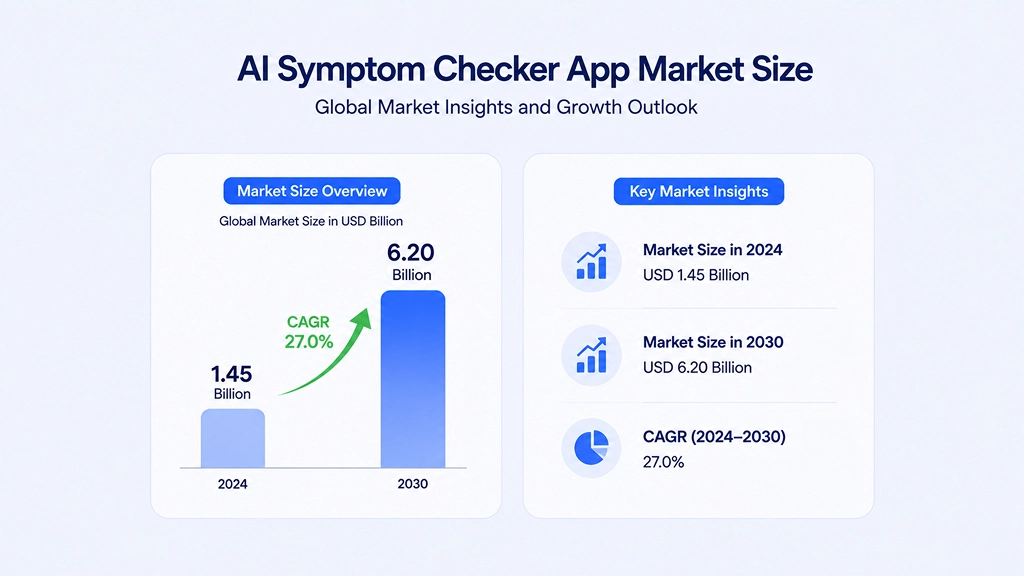
(Source: HTF Market Intelligence, FierceHealthcare / Eliciting Insights Survey, 2026)
For telemedicine platforms, an AI symptom checker also becomes a lead-generation engine — every triage conversation naturally funnels into “Book a doctor now.” With this kind of growth, now is a practical time to invest in AI symptom checker app mobile development and broader AI digital health technologies.
Must-Have Features of an AI Symptom Checker App Development Project
A strong mobile app needs to serve three audiences at once: patients, doctors, and administrators.
For patients:
- Text, voice, and guided-form input: Users like Riya can type, speak, or tap through a questionnaire, whatever feels easiest while stressed or holding a crying child.
- AI-driven condition prediction and risk assessment: Ranks possible conditions by likelihood and severity, so the most urgent one surfaces first.
- Clear triage recommendations: A plain next step: self-care, GP visit, urgent care, or ER, removing the guesswork that sends people to Google at 2 AM.
- One-tap doctor/telemedicine booking: The moment triage suggests “see a doctor,” users can book a video consult instantly. Once a symptom checker recommends a doctor visit, AI can also help clinics improve follow-up and reduce missed appointments. Learn how AI to reduce patient no-shows is changing appointment management.
- Personal health history tracking: Past symptoms and conversations are stored securely, so returning users get context-aware advice.
- Multilingual support: Essential for multi-region hospitals so language never becomes a barrier to timely care.
For businesses that want to extend symptom checking into virtual care, on-demand doctor consultation app development can connect patients directly with doctors after triage.
For doctors and admins:
- Analytics dashboard: Shows triage trends, symptom spikes by region, and which AI recommendations doctors most often override.
- Human review workflows: Every AI-flagged high-risk case routes to a real clinician for a second opinion before advice is finalized.
- Integration with EHRs: Doctors see full patient history, allergies, prescriptions, past visits, the moment a case escalates.
Safety and trust features:
- Clinical guardrails: Hard safety rules that auto-escalate red-flag symptom combinations to emergency care, regardless of AI confidence.
- Conversational AI chatbot: A natural chat experience that feels like messaging a knowledgeable friend, not filling out a hospital form.
- Predictive analytics: Flags recurring symptom patterns over time, sometimes catching chronic conditions early.
- Wearable device integration: Real-time heart rate and oxygen data adds objective signals to what the user reports. If your hospital is considering real-time monitoring beyond symptom triage, these custom patient monitoring system solutions can help identify when standard software is no longer enough.
- Optional image-based symptom recognition: Photo uploads add diagnostic context for visible issues like rashes or wounds.
Getting the full AI symptom checker mobile app features and cost picture right from day one prevents expensive rebuilds later; it’s far cheaper to plan for EHR integration and human review workflows now than to retrofit them after launch.
Beyond symptom assessment, AI can also support preventive wellness through an AI diet and nutrition app that helps users track food intake and receive personalized recommendations.
Advanced AI Features to Consider for Your Symptom Checker Mobile App
Beyond the core must-haves, a few advanced AI capabilities separate a good mobile app from a category leader:
- Predictive AI health risk alerts: Analyzes patterns across past visits and flags rising risk before a condition becomes acute, like a slow climb in headache frequency prompting a check-up.
- Generative AI health summaries: After a triage conversation, generative AI drafts a doctor-ready summary of symptoms and reasoning, saving clinicians time during human review.
- Multimodal AI diagnosis (text + voice + image): Combining conversational input with an uploaded photo or voice tone gives richer signal than text alone, useful for skin conditions or breathing difficulty.
These advanced AI digital health technologies aren’t required for an MVP, but they’re worth roadmapping early since they shape tech stack and data architecture decisions.
As healthcare platforms become more autonomous, AI healthcare agent development can extend beyond symptom checking to appointment management, patient support, monitoring, and other healthcare workflows.
How to Build an AI Symptom Checker App: Step-by-Step Process
Every feature we just covered- the LLM conversation, the medical knowledge base lookup, the clinical guardrails- has to be built and connected in the right order.
This is genuinely how to build an AI symptom checker app the app Riya used at 2 AM, and it’s the same process behind every serious AI symptom checker mobile app development project, whether you’re a hospital chain or a telehealth startup.
Step 1: Requirement Analysis & Consultation: Discovery phase covering target users, regulatory scope, and business goals.
Step 2: UI/UX Design: Wireframes and prototypes focused on simplicity; a panicked parent at 2 AM has zero patience for clutter.
Step 3: Choosing the Tech Stack: The engine room of any AI medical symptom checker tech stack:
| Layer | Common Technologies |
|---|---|
| Frontend | React Native / Flutter (cross-platform mobile) |
| Backend | Node.js, Python (Django/FastAPI) |
| AI/NLP Engine | OpenAI/Anthropic LLM APIs, spaCy, medical NLP libraries |
| Medical Knowledge Base | SNOMED CT, ICD-10, Infermedica or custom datasets |
| Database | PostgreSQL, MongoDB |
| Cloud Infrastructure | AWS or Azure (HIPAA-eligible services) |
| EHR Integration | HL7 FHIR-compliant APIs |
Step 4: AI Model Selection & Training: Fine-tune an existing LLM or use retrieval-augmented generation on top of verified medical knowledge bases, then test against real clinical scenarios.
Step 5: Building Clinical Guardrails: Rule-based logic layered on top of the AI so emergency symptoms are never left purely to probabilistic judgment.
Step 6: EHR Integration: Connecting to hospital systems via FHIR/HL7 standards so patient records sync seamlessly.
Step 7: Setting Up Human Review Workflows: A dashboard where licensed clinicians review, approve, or override AI-generated triage suggestions.
Step 8: Development & QA Testing: Full-cycle coding, edge-case testing, and clinical validation.
Step 9: Deployment & Post-Launch Support: Launch, monitor real-world performance, and continuously retrain the model with new data.
Follow these nine steps in order, and safety gets baked into every layer instead of bolted on at the end- the difference between a symptom checker people trust and one they abandon.
Cost to Develop an AI Symptom Checker Mobile App
Now, the question every founder actually wants answered: what’s the real cost to develop an AI health symptom checker? It comes down to three factors, app complexity, platform choice, and your mobile app development team’s region.
| App Complexity | Core Features | Estimated Cost Range |
|---|---|---|
| Basic MVP | Symptom input, basic AI triage, simple UI | $25,000 – $45,000 |
| Mid-Tier App | LLM integration, medical knowledge base, EHR-ready APIs, multilingual support | $50,000 – $90,000 |
| Advanced/Enterprise App | Full EHR integration, human review workflows, wearable sync, HIPAA/FDA compliance | $100,000 – $180,000+ |
- Platform type: a single platform (iOS or Android only) costs less than building both natively; a cross-platform app (React Native/Flutter) often sits in between.
- Region of your development team: this affects cost more than almost any other factor.
A best mobile app development company in India typically delivers the same AI symptom checker app features and cost efficiency at 40–60% lower rates than agencies in the US or UK, without compromising quality or compliance expertise.
- App complexity: every additional AI capability (image recognition, wearable sync, predictive analytics) adds development and testing time, and therefore cost.
Challenges in AI Symptom Checker Mobile App Development
Every AI symptom checker faces real hurdles worth planning for upfront:
- Accuracy limitations: the AI is never 100% certain on rare or overlapping conditions, which is exactly why human review workflows and clinical guardrails matter.
- Regulatory approval delays: compliance review and medical device classification can add months, and requirements vary by country.
- Keeping medical knowledge bases current: clinical guidelines evolve constantly, so outdated data means outdated advice.
- Bias and fairness in AI models: training gaps can silently skew triage accuracy for underrepresented populations, so models need continuous auditing.
Wearables can also become part of a broader patient monitoring system using IoT and AI, allowing healthcare platforms to combine real-time vital data with AI-driven risk assessment.
Best AI Symptom Checker Mobile App Development Company: Why Choose AlphaKlick Solutions
Back to Riya, the mobile app she used that night correctly flagged her son’s symptoms as “see a doctor within 24 hours,” not an emergency, and connected her instantly with a pediatrician via video call. That calm, accurate moment was built by a team that understood both AI and healthcare deeply.
At AlphaKlick Solutions, we’ve built exactly this kind of trust into real products, from hospital management systems to AI-powered healthcare platforms.
As a healthcare-focused mobile app development company in India, we combine LLM integration, medical knowledge bases, EHR connectivity, and HIPAA-grade security into apps that patients and regulators can actually trust.
Have an idea for an AI symptom checker or healthcare AI product? Book a free consultation with our team and let’s map out your build, timeline, and budget together.
AI Symptom Checker Mobile App Development: FAQs
Question: How long does AI symptom checker mobile app development take?
Answer: A basic MVP with core symptom input and AI triage typically takes 3–4 months. A full-featured, HIPAA-compliant app with EHR integration and human review workflows usually takes 6–9 months, since compliance and clinical testing add real time.
Question: Is an AI symptom checker mobile app legally allowed to give medical advice?
Answer: No, it provides guidance and triage recommendations, not a formal diagnosis. Every app needs clear disclaimers directing users to a licensed doctor for anything beyond general self-care advice.
Question: What’s the biggest cost driver in AI symptom checker mobile app development?
Answer: LLM integration is usually the single biggest factor, followed by EHR connectivity since every hospital system uses different data formats. Regulatory compliance work adds a third major layer of cost.
Question: Can an existing telemedicine mobile app add symptom checker features later?
Answer: Yes, most platforms integrate an AI triage module via API rather than rebuilding from scratch. Just make sure your existing patient data model can accommodate the new triage data.
Question: How accurate are AI symptom checkers?
Answer: Accuracy varies by condition complexity; models perform well on common symptoms but less reliably on rare or overlapping ones. This is why human review workflows and clinical guardrails remain essential, not optional.