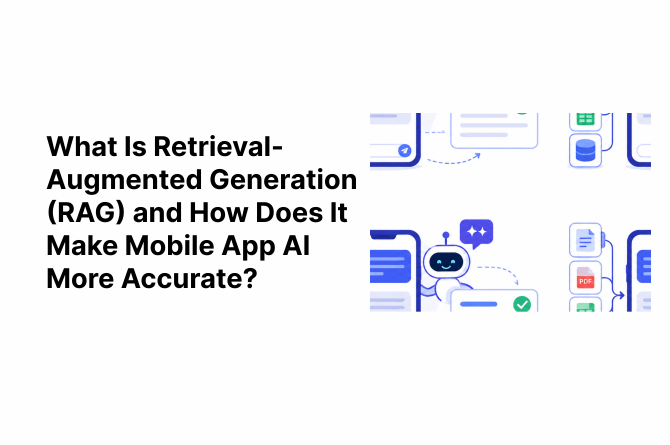
A user opens a food delivery mobile app and asks the chat assistant, “Can I get a refund for a late order?” The assistant says yes, a full refund. But the real policy only offers a coupon. The AI did not lie. It simply did not know the policy, so it guessed.
Our team at AlphaKlick sees this often. The fix we trust most is retrieval-augmented generation, or RAG. Below, we explain what RAG is and what we have learned using it in real mobile app projects.
What Is Retrieval-Augmented Generation (RAG)?
So, what is RAG? RAG is an AI framework that connects a large language model (LLM) to an external knowledge source. Before the model writes a response, the system retrieves relevant information from that source and adds it to the prompt, so the answer is based on real and current data.
In simple words, it makes AI check the facts before it answers, like a student who opens the textbook to the right page instead of answering from memory.
The idea comes from a 2020 research paper by researchers at Facebook AI Research (now Meta AI), titled Retrieval-Augmented Generation for Knowledge-Intensive NLP Tasks.
Why Large Language Models Need Outside Information
LLMs learn from huge amounts of public text, but they do not know your products, policies, or users, and their knowledge stops at their training date.
As we tell clients, the model is smart but new to your business. RAG fills that gap.
How RAG Works Step by Step
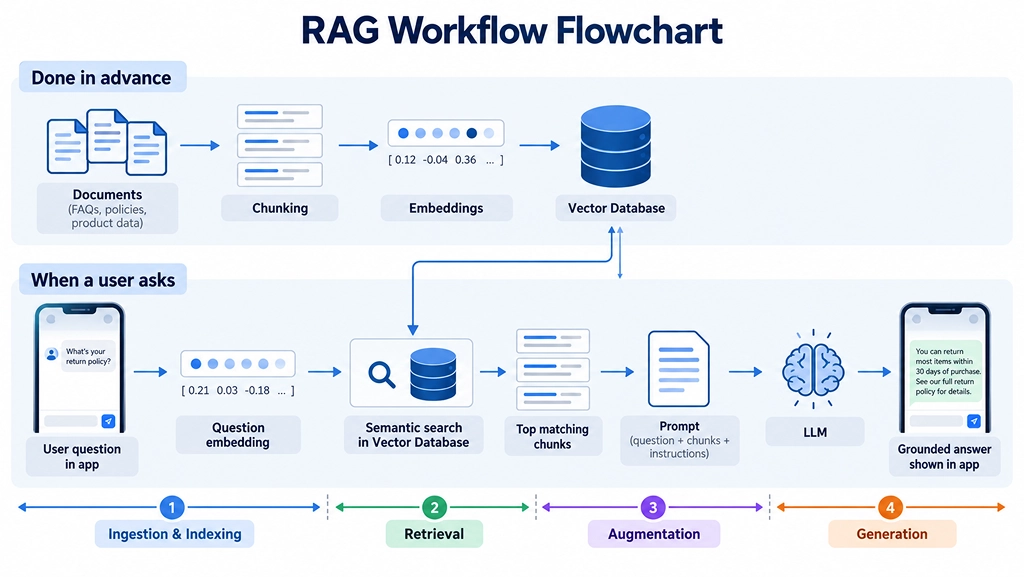
A RAG system works in four stages. Let us walk through them using one simple question inside a shopping app: “Can I change my delivery address after placing an order?”
1. Ingestion and Indexing
Before any user asks anything, your help articles, policies, and product data are split into small chunks and turned into embeddings (number-based versions of text that capture meaning). These are stored in a searchable index, usually a vector database.
2. Retrieval
The user’s question is also turned into an embedding. A semantic search compares meaning rather than exact words and returns the best matching chunks (the top k results), such as your “Order Changes” policy.
3. Augmentation
The retrieved chunks are added to the question with instructions like “answer only from this information.” The prompt must fit the model’s context window, the limit on how much text an LLM can read at once.
4. Generation
The LLM reads the question along with the retrieved facts and writes a grounded reply, meaning the answer is tied to your source content. If your policy allows address changes within 2 hours, that is exactly what the user hears.
Why Mobile App AI Gives Inaccurate Answers Without RAG
1. Hallucinations and Made-Up Facts
When a model does not know something, it often fills the gap with a confident but wrong answer, called a hallucination. One wrong reply about money or health can quickly hurt user trust.
2. Outdated Training Data
A model trained months ago knows nothing about your new products or offers.
3. No Access to App-Specific or User-Specific Information
A plain AI model cannot see a user’s plan or order history, so everyone gets the same general answer.
How RAG Makes Mobile App AI More Accurate
1. Answers Grounded in Your Own Data
With RAG for mobile app AI, every answer starts from your own content. In our experience, this is the most practical way to reduce AI hallucinations, because the model is no longer working from memory alone.
2. Fresh Information Without Retraining the Model
You update the knowledge base, not the model. If a fitness app changes its prices on Monday, the AI can share the new prices that day.
3. Source References That Users Can Check
A RAG system can show the source, like “Refund Policy,” which builds trust.
Better Control Over What the AI Says
You choose which documents the AI can use.
Here is the difference our team usually notices:
| Factor | AI Without RAG | AI With RAG |
|---|---|---|
| Where answers come from | Model memory only | Your own trusted data |
| Up-to-date information | Limited to training data | Updated whenever your data changes |
| App-specific answers | General | Based on your products and policies |
| Hallucination risk | Higher | Lower |
| Source references | Not available | Can be shown to users |
To be honest, RAG does not remove mistakes completely, but it lowers them a lot.
Real Use Cases of RAG in Mobile Apps
1. Customer Support Chatbots
This is where we see the biggest impact. When you integrate an AI chatbot into your mobile app with RAG, AI chatbot accuracy goes up because the bot answers order and refund questions from your actual policy documents.
2. Ecommerce Product Search and Recommendations
A shopper can ask, “Which running shoes under ₹5,000 suit flat feet?” and get suggestions from your real catalog and stock.
3. Healthcare and Fitness Apps
Answers come from approved guides or the user’s own plan. This matters a lot in tools like an AI symptom checker app, where advice must stay safe and consistent.
4. Fintech and Banking Apps
Users ask about charges or loan terms and get answers from your official documents.
5. Internal Enterprise and Field Team Apps
Sales and field teams get answers from SOPs and manuals right on their phones. Some go further with a custom AI agent that also completes tasks.
As an AI-powered mobile app development company in India, we have seen that RAG in mobile apps works best wherever users ask repeat questions that need exact, business-specific answers.
RAG vs Fine-Tuning: Which One Fits Your Mobile App?
Clients often ask us about RAG vs fine-tuning. Fine-tuning retrains the model to change its behavior. RAG gives it the right facts at answer time.
| Factor | RAG | Fine-Tuning |
|---|---|---|
| Setup cost | Lower | Higher |
| Updating information | Quick, just update the data | Needs retraining |
| Best for | Facts, policies, product data | Tone, style, special tasks |
| Accuracy on fresh data | Strong | Weak once data changes |
| Source references | Possible | Not possible |
Our team believes RAG is the right starting point for most apps.
What You Need to Build RAG Into a Mobile App
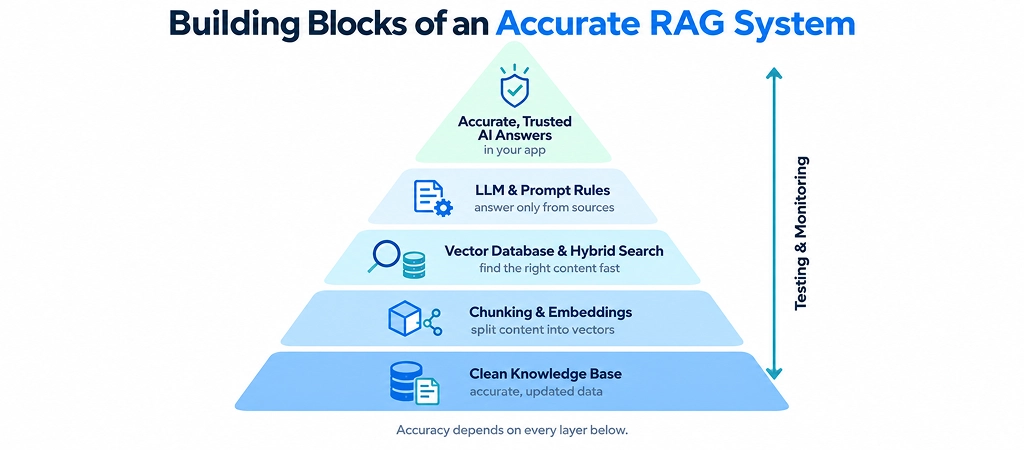
1. A Clean Knowledge Base: Your help articles, FAQs, and product details should be correct, current, and well organized.
2. Embeddings and a Vector Database: A vector database for mobile apps stores your embeddings and helps the system find content by meaning, not just matching words. So a user who types “stop my plan” can still get the article titled “How to cancel your subscription.”
3. Choosing the Right LLM: The right model depends on budget, speed, language support, and privacy. Good LLM integration in mobile apps also means planning for API limits and response time.
Cloud-Based vs On-Device RAG
| Factor | Cloud-Based RAG | On-Device RAG |
|---|---|---|
| Internet needed | Yes | No, or limited |
| Model size | Large models possible | Small models only |
| Privacy | Data leaves the device | Data stays on the device |
| Speed | Depends on network | Fast for small tasks |
| Best for | Most business apps | Offline or privacy-focused apps |
Most mobile apps we work on start in the cloud and later move a few simple tasks onto the device.
Common Challenges and How to Handle Them
1. Poor Quality or Messy Source Data
If your documents are old or conflicting, the AI will repeat those mistakes. Removing duplicates and adding metadata like date and category helps retrieval pick the right version.
2. Response Speed on Mobile Networks
Each answer needs a search plus a model call. Caching frequent answers and streaming replies keeps the app fast.
3. Data Privacy and Security
A user should only get answers from data they are allowed to see. Health apps also need HIPAA-compliant app development to keep patient data safe.
4. Cost of API Calls at Scale
LLM APIs usually charge per token, so long prompts cost more. Sending only the top few chunks and caching repeat questions keeps costs in check.
Best Practices for Accurate RAG Results
- Chunk content carefully, with a little overlap so context is not lost.
- Use hybrid search (keyword plus vector) so exact terms like product codes are not missed.
- Re-rank results so the most relevant chunks reach the model first.
- Test with real user questions and measure both retrieval and answer quality.
- Add a fallback reply like “I could not find this. Let me connect you to support.”
These small habits do more to reduce AI hallucinations than any fancy setup.
How AlphaKlick Builds Accurate RAG-Powered Mobile Apps
Our team has learned that an AI feature is only as good as the process behind it. Here is how we approach every RAG project.
Step 1: We Start With Your Users, Not the Technology
Before choosing tools, we study real questions from support tickets, chat logs, and app reviews to see where wrong answers hurt the most.
Step 2: We Audit and Clean Your Data
We check your content for old or conflicting information. For example, if your FAQ says delivery takes 3 days, but your policy page says 5, we flag it before the AI ever sees it.
Step 3: We Pick the Right Setup for Your Mobile App
We plan the LLM integration in mobile apps, the vector database, and the cloud or on-device setup around your budget and privacy needs.
Step 4: We Add Safety Rules to the AI
The AI answers only from approved sources and says “I am not sure” instead of guessing, with a human handoff for payments or health topics.
Step 5: We Test Like Real Users
We test with tricky questions, including typos and Hinglish, check AI chatbot accuracy, and fix weak answers.
Step 6: We Launch Small, Then Improve
We run a pilot with a small user group, fix failing questions, then roll out fully and keep improving after launch.
Why Clients Work With Us
We handle app and AI development under one roof, so your RAG system fits your app’s speed and user experience. As an AI-powered mobile app development company in India, we focus on AI features your users can actually trust.
If you are planning RAG in mobile apps or want to fix an AI feature that keeps giving wrong answers, talk to the AlphaKlick team.
FAQs
Question: Is RAG better than fine-tuning for mobile apps?
Answer: For most apps, yes. In RAG vs fine-tuning, RAG is cheaper, easier to update, and better for factual answers.
Question: Can RAG work offline on a mobile device?
Answer: Yes, but with limits. On-device RAG uses small models and a local vector database for mobile apps, which works for simple tasks without internet.
Question: Does RAG completely stop AI hallucinations?
Answer: No. It greatly lowers them, but good data and testing are still needed.
Question: How much does it cost to add RAG to an existing app?
Answer: It depends on data size, users, model choice, and features. If you also plan to add agents, our breakdown of AI agent development cost can help you budget.
Question: What type of data can be used in a RAG system?
Answer: FAQs, help articles, catalogs, PDFs, and user data with access controls. This flexibility makes RAG for mobile app AI very useful.