Ask any developer on our team what has changed most in their daily work, and you’ll hear the same answer: they now write code alongside an AI. It suggests the next line, drafts the test cases, and explains the legacy function nobody wanted to touch.
At AlphaKlick, we build mobile apps, web platforms, and AI products for clients in healthcare, education, and ecommerce. AI-assisted software development is now part of how we work every single day.
And in our experience, it doesn’t replace developers. It takes away the boring parts so they can focus on the hard ones.
What is AI-Assisted Software Development?
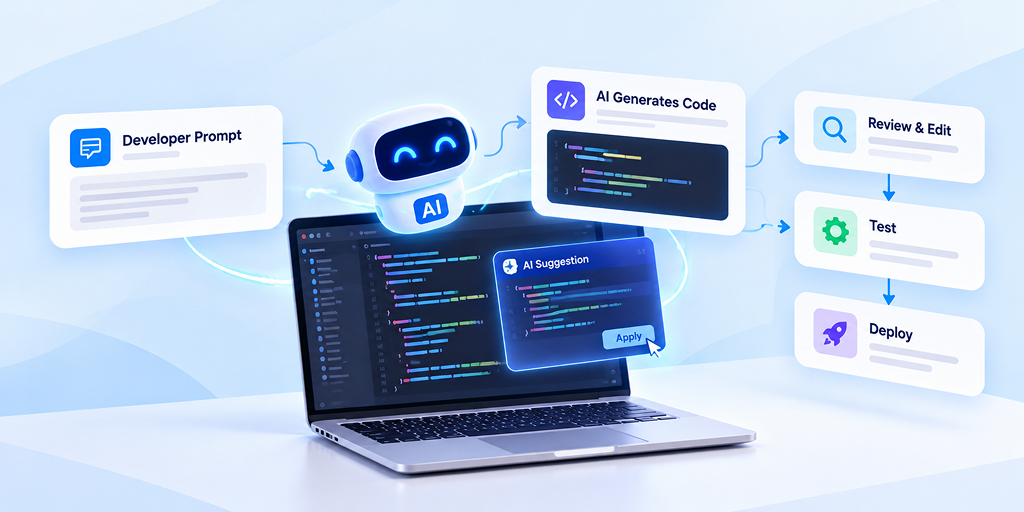
AI-assisted software development is a way of building software where developers use artificial intelligence to help with coding, testing, debugging, and documentation. The developer stays in charge. The AI works like a fast, well-read pair programmer sitting next to them.
Most of this help comes from AI coding assistants built on large language models. They read your code and comments, understand what you’re trying to do, and suggest code, fixes, or explanations.
People often mix up three terms, so here’s how we explain them to our clients:
- AI-assisted development: The developer writes and owns the code. AI suggests, speeds up, and double-checks the work.
- AI-generated development: AI writes large chunks of code from prompts, and developers review and refine it.
- Autonomous development: AI agents plan, write, test, and ship code with very little human input. It’s still early and risky for production systems.
Most AI-powered software development in real client projects today, including ours, sits in the first two groups. We think that’s the right balance for now.
To understand how autonomous AI agents differ from the AI assistants developers use today, see our guide to AI Agents vs AI Assistants.
AI-Assisted Development vs. Traditional Development
The easiest way to understand the shift is to put the two side by side. This table reflects what our team sees in everyday project work.
| Factor | Traditional Development | AI-Assisted Development |
| Speed | Every line typed and researched by hand | Boilerplate, tests, and docs drafted in seconds |
| Cost | High effort spent on repetitive tasks | Less effort on routine work, more budget for features |
| Code quality | Depends fully on manual review | Extra layer of automated checks and suggestions |
| Debugging | Reading logs and searching forums | AI explains errors and suggests likely fixes |
| Scalability | Output limited by team size | Same team handles more work |
| Human role | Writes everything | Designs, reviews, decides, and owns the result |
AI-Assisted Software Development: Market Insights and Demand
Demand for AI-assisted software development isn’t a passing trend. Our team sees it in almost every client conversation, and independent research backs it up:
| Market Insight | Key Figure | Source |
| Enterprise adoption forecast | 90% of enterprise software engineers will use AI code assistants by 2028, up from under 14% in early 2024 | Gartner |
| Developer adoption today | 84% of developers use or plan to use AI tools, up from 76% the year before | Stack Overflow Developer Survey 2025 |
| Daily usage | 50.6% of professional developers use AI tools every day | Stack Overflow Developer Survey 2025 |
| The trust gap | 46% of developers actively distrust the accuracy of AI output | Stack Overflow Developer Survey 2025 |
Sources: Gartner, via GitHub and Stack Overflow Developer Survey 2025
How AI-Assisted Software Development Works
Under the hood, these tools run on large language models (LLMs) trained on huge amounts of public code and technical writing. Machine learning helps them spot patterns, and natural language processing lets them understand plain-English requests like “write a function that validates Indian phone numbers.”
That’s why generative AI for developers feels so natural to use. You describe the problem, and the tool responds with code you can review
AI Across the Software Development Lifecycle
AI no longer sits in one corner of a project. Here’s what an AI-driven software development lifecycle looks like in practice:
| SDLC Stage | How AI Helps | What the Developer Does |
| Planning and requirements | Turns meeting notes into user stories and acceptance criteria | Confirms scope with the client |
| UI/UX design | Suggests wireframe ideas and UI copy | Finalizes design and brand fit |
| Coding | Completes code, writes boilerplate, converts between languages | Designs architecture and core logic |
| Code review and refactoring | Flags bugs, code smells, and security issues | Approves or rejects changes |
| Testing and QA | Writes unit tests and test data | Plans edge cases and real-user testing |
| Deployment and DevOps | Drafts CI/CD scripts and config files | Controls releases and infrastructure |
| Documentation and maintenance | Writes docs and explains old code | Keeps docs accurate |
Where the Human Stays in Control
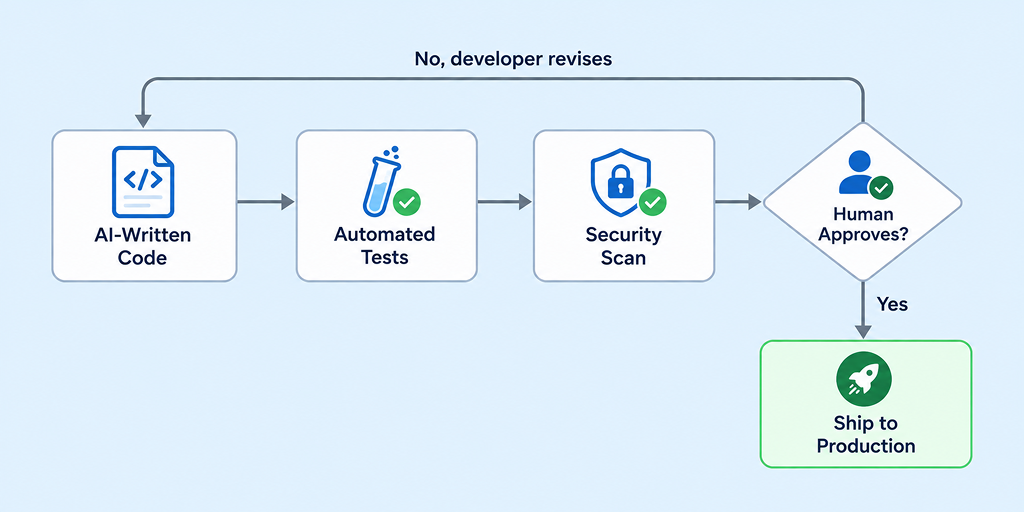
An AI-driven software development lifecycle still needs a person at every checkpoint. Our team calls this the “human-in-the-loop” rule: AI can suggest anything, but nothing reaches production until a developer has read it, tested it, and approved it.
Popular AI Tools Developers Use Today
The market for AI tools for software development has grown quickly, and most of them use generative AI for developers in slightly different ways. These are the ones we come across most often:
| Tool | Best For | SDLC Stage |
| GitHub Copilot | Code suggestions inside the editor | Coding |
| Cursor | AI-first code editor for multi-file changes | Coding, refactoring |
| ChatGPT / Claude | Problem-solving, explaining code, drafting docs | Planning, coding, documentation |
| Amazon Q Developer | AWS-focused coding and cloud help | Coding, DevOps |
| Tabnine | Private, team-trained code suggestions | Coding |
| Snyk | Finding security vulnerabilities | Review, testing |
| Figma AI | Quick UI ideas and layouts | Design |
Our honest take: no single tool does everything. Our developers usually pair one or two AI coding assistants in the editor with a chat-based model for planning and debugging.
The right AI tools for software development depend on your tech stack, your security needs, and your budget, not on what’s trending this month.
Before introducing AI into your software development process, it is important to assess whether your team, data, and existing systems are ready to support it. An AI readiness assessment helps identify potential gaps, define clear goals, and determine what needs to be in place before adopting AI-assisted development.
Key Benefits of AI-Assisted Software Development
The benefits of AI in software development go well beyond writing code faster. Here’s what we’ve noticed across our own projects.
1. Faster delivery: Repetitive work like CRUD screens, API wrappers, and form validation now takes minutes instead of hours. In a controlled study, GitHub found that developers using Copilot finished a coding task 55% faster than those working without it.
2. Better code quality: AI catches small mistakes early, like missing null checks, unused variables, or unsafe queries. Fewer bugs reach QA, so testing cycles get shorter.
3. Lower development costs: When routine work takes less time, clients pay for features, not boilerplate. This makes AI in software development especially useful for startups working with tight budgets.
4. Faster onboarding: New team members can ask AI to explain an unfamiliar codebase. For our team, this has made it much easier to bring a developer into an existing project.
5. More time for real problem-solving: Developers spend less energy on syntax and more on architecture, performance, and user experience. Those are the parts that decide whether a product succeeds.
6. Documentation that keeps up: Nobody enjoys writing docs. AI drafts them, developers polish them, and the documentation finally matches the code.
If you ask us, the biggest of all the benefits of AI in software development isn’t speed. It’s that developers get to spend more of their day on work that truly needs a human brain.
Real-World Use Cases of AI in Software Development
These are the AI software development use cases we see most often across the industries our team works with, along with a practical example of each:
1. Mobile app development: In React Native and Flutter projects, AI speeds up screen layouts, state management, and API integration. As a mobile app development company in India, this is where our team sees the biggest time savings.
Example: Generating a typed API client and state management code from the backend’s OpenAPI spec, so developers start on the screen logic instead of hand-writing request code.
2. Web and SaaS platforms: AI helps build dashboards, admin panels, and role-based access faster, which matters when a SaaS product needs to launch quickly.
Example: Scaffolding a role-based access control (RBAC) module for a multi-tenant dashboard, including middleware, permission tables, and the admin screens to manage them.
3. Healthcare software: For hospital management systems and telemedicine apps, AI helps write data validation and test cases. Our developers still handle HIPAA and privacy rules carefully by hand.
Example: Writing validation rules for patient records, such as date formats, ICD-10 codes, and mandatory consent fields, then generating test cases that check each rule.
4. EdTech and LMS platforms: AI helps create quiz logic, progress reports, and content workflows for learning platforms.
Example: Building auto-graded quiz logic with randomized question banks and scoring rules, plus realistic test data for hundreds of simulated student attempts.
5. Ecommerce: AI-powered software development makes it easier to build product recommendations, smart search, and chatbots that answer shopper questions.
Example: A support chatbot that answers “Where is my order?” and return-policy questions by pulling live data from the store’s order API.
6. Legacy code modernization: AI can read old PHP or jQuery code, explain what it does, and help move it to modern frameworks like Laravel or React.
Example: At a much larger scale, Amazon used Amazon Q Developer to upgrade tens of thousands of production apps to Java 17, which AWS says saved over 4,500 years of development work.
7. Automated testing: For large mobile apps, AI generates unit and regression tests that would take a QA team weeks to write by hand.
Example: Generating unit tests for existing functions, plus end-to-end test scripts for critical flows like login, checkout, and payment confirmation.
What connects all these AI software development use cases is simple. AI handles the predictable work, and developers handle the decisions.
For businesses planning an AI-powered mobile product, it can also help to compare experienced AI mobile app development companies before choosing a development partner.
How We Use AI-Assisted Development at AlphaKlick
We piloted AI tools on internal projects first, then built them into a defined workflow across our React Native, Flutter, Laravel, Node.js, and Python projects:
- Scoping: AI turns client briefs into user stories and drafts the first data model and OpenAPI specs. Our PMs and engineers refine both.
- Architecture: Senior engineers own the schema, auth, and hosting decisions. AI only reviews the design for scaling limits and security gaps.
- Development: AI coding assistants handle boilerplate like CRUD endpoints, migrations, and API clients, using our coding standards as context. Business logic and payment flows stay with senior developers.
- Testing: AI writes the first pass of unit tests and edge-case test data. QA adds integration, end-to-end, and real-device testing.
- Release: Every pull request gets human code review, and our CI pipeline runs tests and vulnerability scans before merge. No client code or data goes into public AI tools.
That mix of speed and human judgment is what makes AI-powered software development reliable enough for client work.
A Real Example: SooraApp
SooraApp is an AI-powered event photo-sharing platform our team built. Photographers were spending hours sorting thousands of event photos, and guests struggled to find their own pictures in huge galleries.
The product used AI to solve that problem, and our developers used AI-assisted workflows to build it. You can read the full story in our SooraApp case study.
Ready to Build Faster With AI?
Got a product idea, or an existing app that’s slowing your team down? Our developers combine AI-assisted workflows with hands-on engineering experience, so you get faster delivery without cutting corners on quality or security.
We’ll look at your project, show you which AI software development use cases fit your business, and give you a clear plan with honest timelines.
Book a free 30-minute consultation or explore our AI development services to see what we can build together.
FAQs
Question: Is there an AI that can develop software?
Answer: Yes, for simple apps and features. AI coding agents can write and test code from a prompt, but business software still needs developers to design, review, and maintain it.
Question: How is AI used in software development?
Answer: AI helps with code generation, testing, bug detection, documentation, and legacy code updates. Popular AI tools for software development include GitHub Copilot, Cursor, ChatGPT, and Claude.
Question: What is an AI software developer?
Answer: It’s either a developer who builds AI-powered products, or an AI agent that writes code. Most teams today pair human developers with generative AI for developers.
Question: Is AI replacing software devs?
Answer: No. AI takes over repetitive work like boilerplate and tests, while developers focus on architecture, business logic, and security.