It started with a WhatsApp message from a client at 11 p.m.
“Our support team is drowning. Can AI actually fix this, or is it just hype?”
We get some version of this question every week at AlphaKlick. And our answer is always the same: generic chatbots won’t fix a real business problem, but a custom AI agent, built around your workflows, your data, and your customers, can.
That single conversation is actually why we sat down to write this guide.
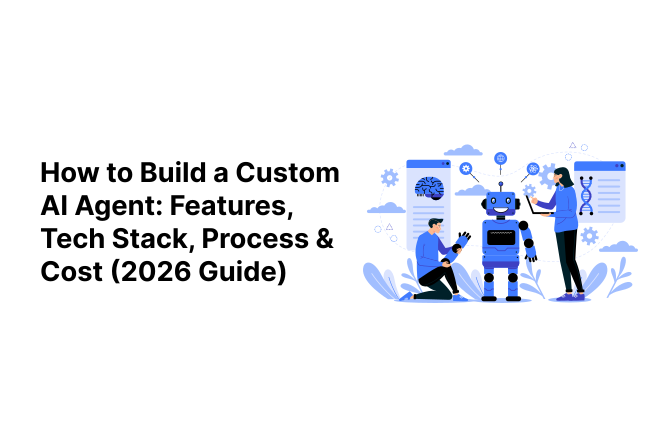
If you’re a founder, product owner, or CTO trying to figure out how to build a custom AI agent in 2026, this is the walkthrough we wish someone had handed us before our first agent build.
We’ll cover what an AI agent actually is, the features it needs, the tech stack that powers it, the step-by-step process, and the question everyone actually cares about: custom AI agent development cost and tech stack choices that affect your final bill.
We’ve also added real market data (with sources), so you’re not just taking our word for it.
What is a Custom AI Agent?
Let’s clear up the confusion first, because “AI agent” gets thrown around loosely.
A chatbot answers questions. A traditional automation (RPA) tool follows fixed if-this-then-that rules.
An AI agent is different; it can understand a goal, reason through steps, use tools (APIs, databases, apps), and complete a task with minimal human input. Think less “answer machine,” more “digital employee.”
A chatbot answers questions. Traditional automation follows fixed if-this-then-that rules. AI workflow automation goes further by combining intelligent decision-making with automated business processes.
Common types of AI agents:
- Task-specific agents: handle one job well (e.g., an agent that processes refund requests)
- Autonomous multi-step agents: plan and execute a sequence of actions to reach a goal
- Multi-agent systems: several specialized agents collaborating (one researches, one drafts, one verifies)
Our client’s support problem, for example, needed a task-specific agent that could read a ticket, check order status in the CRM, and either resolve it or escalate it, with no human touching the first 70% of tickets.
Looking for something more conversational and support-focused? See our guide on AI chatbot integration for mobile apps.
Why Businesses Need a Custom AI Agent
Off-the-shelf AI tools are tempting because they’re fast to set up. But they hit a wall quickly: they don’t know your data, can’t talk to your internal systems, and can’t be shaped around your compliance needs.
This becomes especially important in regulated industries such as healthcare, where AI agents in healthcare must account for data privacy, compliance, and human oversight.
At AlphaKlick, our team has noticed a pattern across nearly every client engagement: businesses try a no-code tool first, hit an integration or accuracy limit within 2-3 months, and then come to us to rebuild it properly.
Our recommendation? Skip that detour if you already know your use case is core to the business; go custom from day one.
Signs you’re ready to invest in a custom-built agent:
- A repetitive workflow is eating hours of human time weekly
- You need the agent to talk to 2+ internal systems (CRM, ERP, database)
- Data privacy or compliance rules out sending information to third-party tools
AI Agent Architecture and Features Guide
This is the part most guides skim over, so let’s slow down. A solid AI agent architecture and features guide should always include these building blocks:
| Feature | What It Does | Why It Matters |
|---|---|---|
| Natural Language Understanding | Interprets user intent, not just keywords | Reduces failed/misunderstood requests |
| Tool & API Integrations | Connects to CRM, ERP, payment systems, databases | Lets the agent actually act, not just chat |
| Multi-step Reasoning | Plans and executes a sequence of tasks | Enables real task completion, not one-off replies |
| Memory & Personalization | Remembers past interactions/context | Feels less robotic, more useful over time |
| Human-in-the-Loop | Escalates uncertain cases to a person | Prevents costly mistakes |
| Guardrails & Security | Limits what the agent can access or do | Protects data and prevents misuse |
| Analytics Dashboard | Tracks accuracy, resolution rate, cost per task | Shows ROI to leadership |
We tell every client the same thing: guardrails are not optional. AI agent tools, integrations, and guardrails need to be planned together from day one; bolting on safety controls after launch is far more expensive than designing them in from the start.
Before planning the development, it’s important to understand AI agents vs AI assistants and how their capabilities differ.
Tech Stack for Building AI Agents in 2026
This is usually where the “hype vs. reality” conversation happens with clients.
Here’s the tech stack for building AI agents in 2026 we typically recommend, layer by layer:
| Layer | Common Options (2026) | Our Take |
|---|---|---|
| Foundation Model (LLM) | Claude, GPT-4 class models, open-source (Llama, Mistral) | Choose based on reasoning quality vs. cost, not hype |
| Orchestration Framework | LangChain, LlamaIndex, CrewAI | Great for multi-step task chains and tool calls |
| Knowledge Retrieval (RAG) | Vector databases (Pinecone, Weaviate, pgvector) | Essential if the agent needs your private data |
| Backend & APIs | Node.js, Python (FastAPI), serverless functions | Keeps the agent connected to real systems |
| Frontend/Interface | Web widget, Slack/WhatsApp bot, internal dashboard | Match the interface to where users already work |
| Cloud & Deployment | AWS, GCP, Azure | Pick based on your existing infrastructure |
Our recommendation for most mid-size businesses: start with a proven LLM + a lightweight orchestration layer + RAG for your own data.
Skip building a fully custom model from scratch; it’s rarely worth the cost unless you’re operating at massive scale.
Understanding generative AI vs agentic AI helps businesses choose the right approach for building AI-powered solutions.
AI Agent Development Process: Step by Step
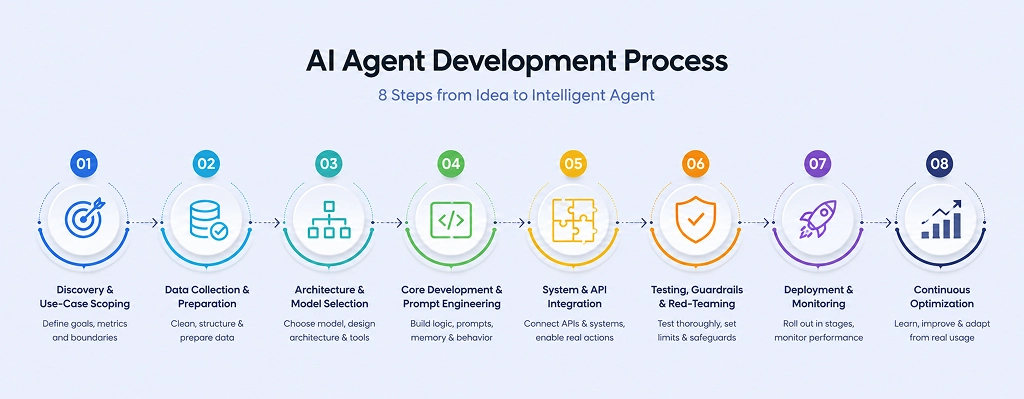
Every project we’ve delivered follows the same AI agent development process step by step, and skipping steps is exactly where most failed projects go wrong.
Here’s what actually happens at each stage, technically:
Step 1: Discovery & Use-Case Scoping
We define the exact task boundary, success metrics (e.g., resolution rate, response time, cost per interaction), and failure tolerance.
Output: a scope document listing every system the agent must talk to and every action it’s allowed to take.
Business Goal + Constraints → Scope Document
Step 2: Data Collection & Preparation
We audit existing data sources (CRM records, knowledge bases, ticket logs, documents), clean and de-duplicate them, and structure them for retrieval. If the agent needs private/company-specific knowledge, this is where we chunk documents and prepare them for embedding into a vector database.
Poor data here is the #1 cause of inaccurate agents later.
Raw Data → Cleaned + Chunked + Embedded Data
Step 3: Architecture & Model Selection
We decide: single-agent or multi-agent system, which LLM fits the reasoning complexity and budget, and whether RAG (retrieval-augmented generation) is needed.
We also map out the tool-calling schema, exactly which functions/APIs the agent is permitted to invoke, with what parameters.
Task Complexity + Budget → Model + Architecture Decision
Step 4: Core Development & Prompt/Behavior Engineering
This is where the orchestration layer (e.g., LangChain, CrewAI) gets wired up.
We build the system prompts, define the agent’s reasoning loop (plan → act → observe → repeat), set up memory handling (short-term session memory vs. long-term stored context), and implement fallback logic for low-confidence responses.
System Prompts + Tool Schema → Working Agent Logic
Step 5: System & API Integration
The agent connects to real systems- CRM, ERP, payment gateway, internal databases- via authenticated API calls. We build middleware/webhooks here so the agent can both read data (e.g., check order status) and write actions (e.g., update a ticket, trigger a refund) safely.
Agent Logic + APIs → Action-Capable Agent
These integrations are also important for solutions such as AI skills assessment platforms, where AI needs to work with candidate data, assessment workflows, and reporting systems.
Step 6: Testing, Guardrails & Red-Teaming
Before any real user touches it, we run structured test cases: edge-case inputs, adversarial prompts, and permission-boundary tests (can it access data it shouldn’t?).
We set hard guardrails, rate limits, escalation triggers, and confidence thresholds below which the agent hands off to a human.
Test Cases + Guardrails → Safe-to-Launch Agent
Step 7: Deployment & Monitoring
We deploy in a staged rollout (internal team first, then a small user segment, then full release), with a live dashboard tracking accuracy, escalation rate, latency, and cost per task from day one.
Staged Rollout + Live Monitoring → Production Agent
Step 8: Continuous Optimization
Real usage always surfaces edge cases the test phase missed. We review logs weekly in the first month, retrain/adjust prompts based on failure patterns, and tune the retrieval pipeline as the underlying data changes.
Usage Logs + Feedback → Optimized Agent
Our recommendation: budget as much technical time for Steps 2 and 6 (data prep and testing/guardrails) as you do for Step 4 (core development).
That’s where most of the “why isn’t this working” problems actually originate, not in the model itself.
Before planning the development of a custom AI agent, businesses should evaluate their data quality, technology infrastructure, budget, and internal workflows. An AI readiness assessment can help identify these requirements early and determine whether the business is prepared to move forward with development.
Custom AI Agent Development Cost and Tech Stack: What Drives the Price
Now, the number everyone’s really here for.
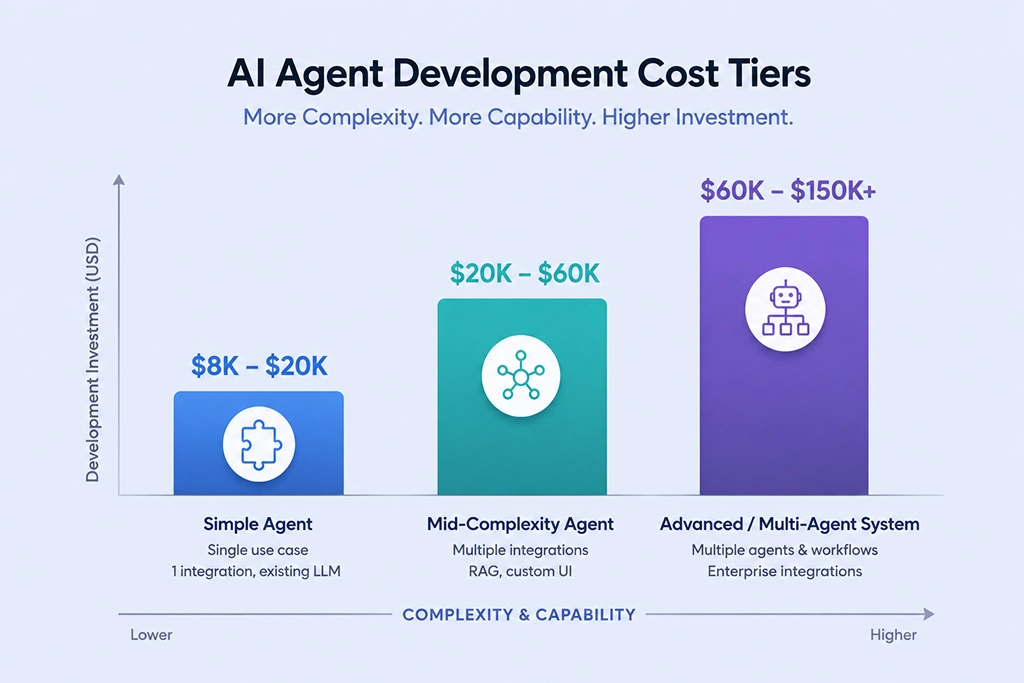
Custom AI agent development cost and tech stack decisions are tightly linked, a more complex stack (multi-agent, heavy integrations, fine-tuned models) always costs more than a single-purpose agent using an existing LLM.
Here’s a rough enterprise AI agent pricing breakdown based on complexity:
| Agent Complexity | Typical Scope | Estimated Cost Range |
|---|---|---|
| Simple task agent | Single use case, 1 integration, existing LLM | $8,000 – $20,000 |
| Mid-complexity agent | Multiple integrations, RAG, custom UI | $20,000 – $60,000 |
| Advanced/multi-agent system | Multiple collaborating agents, complex workflows, enterprise integrations | $60,000 – $150,000+ |
Beyond the initial build, the cost to build an AI agent for business doesn’t end at launch. Budget for:
- Ongoing API/token usage costs
- Model retraining and fine-tuning
- Maintenance and monitoring
- Support and iteration based on real usage data
Our honest advice: don’t just compare vendor quotes on the build cost alone. Ask about their maintenance retainer, and what happens when the model provider changes pricing; that’s usually where budgets get blown six months in.
AI agent development costs can vary significantly based on complexity, integrations, and ongoing infrastructure. For a detailed 2026 pricing breakdown, see our guide to AI agent development cost.
Common Challenges & How to Overcome Them
Every project hits friction somewhere. The recurring ones we see:
- Data quality issues: Fix this before writing a single line of agent logic
- Hallucination/reliability concerns: Solved largely through RAG + guardrails, not bigger models
- Legacy system integration: Often the single biggest time cost on a project
- User adoption resistance: Solved through gradual rollout, not a big-bang launch
AI Agent Market Size, Growth & Demand Statistics 2026
We’re not the only ones saying agents are having a moment; the data backs it up. Here’s what the market research actually shows:
| Source | Key Data Point | Link |
|---|---|---|
| Grand View Research | Market valued at $7.6B in 2025, projected to hit $10.9B in 2026, growing to $182.9B by 2033 (49.6% CAGR) | grandviewresearch.com |
| Precedence Research | Market at $7.92B in 2025, expected to reach $11.55B in 2026, growing toward $294.66B by 2035 | precedenceresearch.com |
The pattern across all sources is the same: the market is expanding rapidly, and vertical, business-specific agents are growing faster than generic ones.
How to Choose the Right AI Agent Development Partner
Ask any vendor:
Have they built agents with real API integrations, or just chat interfaces?
Do they design guardrails by default?
What’s included post-launch?
Can they show a real outcome, not just a demo?
Red flags: vague timelines, no mention of data security, pricing that skips maintenance.
Many clients also need the agent and the app it lives in; one reason AlphaKlick has grown into an AI mobile app development company in India, alongside our broader AI solutions work in machine learning and intelligent automation. Owning both under one roof beats coordinating two vendors.
If you’re weighing whether to build a custom agent for your business, our team is happy to walk through your use case and a realistic cost estimate, no generic sales pitch.
Book a free consultation with our strategy team →
FAQs
Question: How long does it take to build a custom AI agent?
Answer: A simple task-specific agent can take 4-6 weeks; complex multi-agent systems with heavy integrations can take 3-6 months.
Question: Can AI agents work with our existing software?
Answer: Yes, most custom agents are built specifically to integrate with CRM, ERP, and internal databases via APIs.
Question: Is a custom AI agent worth it for a small business?
Answer: If a workflow is repetitive and time-consuming, yes, even a simple agent can pay for itself within a few months.
Question: What’s the highest hidden cost after launch?
Answer: Ongoing API/token usage and maintenance; budget 15-20% of build cost annually for upkeep.
Question: Do we need our own dataset to build an AI agent?
Answer: Not always, but if you want the agent to answer questions specific to your business, some form of structured data or documentation is required for RAG.