
Key Highlights:
- A custom patient monitoring system fixes the exact problems generic software can’t: disconnected data, alert fatigue, and poor EHR integration.
- Watch for 7 clear signs: data silos, false alarms, weak integrations, compliance risk, remote care gaps, rising costs, and scaling limits.
- Custom-built solutions typically cost more upfront but reduce long-term expenses through fewer manual errors, better staff efficiency, and easier scaling.
Most hospitals start with ready-made patient monitoring software for hospitals because it’s quick to install and cheaper upfront. It works fine for a while.
Then patient volume grows. Departments multiply. The software starts showing cracks, missed alerts, disconnected devices, and staff wasting time on manual data entry.
Working with healthcare teams at AlphaKlick over the years, we’ve seen this pattern repeat often. Hospitals don’t realize they’ve outgrown their healthcare monitoring software until something breaks.
That’s usually the moment a proper hospital management system, built around their actual workflow, becomes the real fix.
This blog covers the 7 clearest signs it’s time to switch, what to look for, and how a custom solution actually works, without the technical jargon.
What is a Custom Patient Monitoring System?
A custom patient monitoring system is software built around your hospital’s exact workflow, your equipment, your departments, your compliance rules. It’s built to fit your hospital, not the other way around.
It tracks a patient’s vital signs monitoring system in real time, covering:
- Heart rate and oxygen levels
- Blood pressure and temperature
- Alerts pushed instantly to nurses, doctors, and admins in one connected view
This matters most in high-stakes settings like an ICU patient monitoring system, where even a short delay in an alert can affect patient outcomes.
That’s usually the moment a custom hospital management system built around their actual workflow becomes the real fix. Learn how custom platforms streamline hospital operations in our guide on Custom Hospital Management System Development for Streamlining Healthcare Operations.
Why “One-Size-Fits-All” Monitoring Software Fails Hospitals
Generic tools are built for the average hospital, not yours. A custom hospital monitoring solution is shaped around how your teams actually work, not a fixed template.
| Off-the-Shelf Software | Custom Patient Monitoring System |
| Fixed features, hard to change | Built around your exact workflow |
| Limited device/EHR integration | Deep integration with existing systems |
| Generic alerts, high false-alarm rate | Smart, role-based, condition-specific alerts |
| Slower vendor support cycles | Faster fixes since it’s built for you |
| One-time licensing, hidden scaling costs | Predictable costs as you grow |
If two or more of these sound familiar, it’s worth reading the signs below.
A modern hospital management system development strategy connects patient monitoring, admissions, billing, clinical workflows, and hospital operations into one unified platform instead of relying on disconnected software.
Signs Your Hospital Needs a Custom Patient Monitoring System
Here’s a quick snapshot of all 7 signs before we break each one down:
| Sign | What It Looks Like |
| Frequent data silos | Departments use disconnected tools that don’t sync |
| Alert fatigue | Too many false alarms; staff start ignoring them |
| Weak EHR/device integration | Nurses manually re-enter vitals into records |
| Compliance & security risk | Audits reveal gaps in encryption or access controls |
| Growing remote/telehealth needs | No way to monitor patients after discharge |
| Rising operational costs | Manual data entry eats up staff hours |
| Can’t scale | Adding beds or facilities requires starting over |
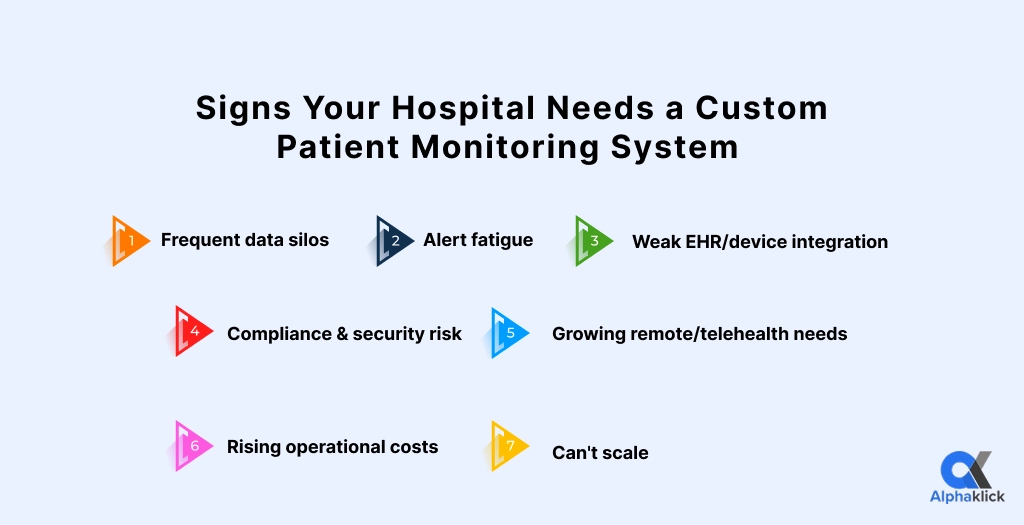
1. Frequent Data Silos Between Departments
The ICU, general wards, and lab often use different tools that don’t sync with each other. Nurses end up cross-checking data manually, department by department.
A connected hospital monitoring platform solves this by pulling every department’s data into one dashboard; no more chasing information across five different screens.
2. Nurses/Staff Are Overwhelmed by False Alarms (Alert Fatigue)
When a monitor beeps for every minor fluctuation, staff start tuning it out. That’s dangerous in a hospital setting.
A smart patient monitoring software setup fixes this with:
- Condition-based alert thresholds instead of generic defaults
- Role-based alerts, so the right person gets notified
- Fewer, more accurate alerts overall
3. Your System Can’t Integrate with EHR, Labs, or Devices
If nurses are manually typing vitals into your EHR because the monitor and records system don’t talk to each other, that’s a warning sign.
One of the most important patient monitoring system features to look for is native integration with:
- EHR and patient records
- Lab systems
- Existing bedside devices
4. Compliance & Data Security Risks Are Increasing
Patient data is sensitive, and regulators know it. If your setup makes HIPAA or local data-protection compliance harder instead of easier, that’s a red flag.
Reliable healthcare monitoring software should have these built in from day one, not added later:
- End-to-end encryption
- Role-based access controls
- Full audit logs for every data access
5. Remote & Telehealth Monitoring Needs Are Growing
Patients now expect care to extend beyond hospital walls. If your hospital wants to monitor discharged or at-home patients, you need a proper remote patient monitoring platform.
This lets vitals from wearables or home devices stream securely back to your care team in real time, without patients needing to stay admitted.
Hospitals that invest early in a proper remote patient monitoring platform are better positioned to support post-discharge care, which is quickly becoming an expectation rather than an extra service.
6. Rising Operational Costs from Manual Monitoring Processes
Every manual step adds up in staff hours:
- Re-entering data by hand
- Cross-checking charts across systems
- Chasing missing or delayed readings
A well-built patient monitoring software for hospitals automates these repetitive tasks, freeing nursing staff to spend more time with patients instead of paperwork.
For a mid-sized hospital, manual monitoring workflows can quietly cost tens of thousands of dollars a year in extra staff hours alone, before counting errors caused by manual data entry.
7. Inability to Scale as Patient Volume or Hospital Network Grows
Adding new beds, departments, or a second facility shouldn’t mean starting over. If scaling your current tool means buying a new license or losing historical data, that’s a limit worth fixing.
The right patient monitoring system development approach is built to grow with you, new wards, new facilities, same system.
Hospitals can also use an AI symptom checker mobile app to help patients assess symptoms, understand urgency, and determine the appropriate next step before visiting a healthcare provider.
Benefits of Switching to a Custom-Built Monitoring System
Hospitals that switch to a custom patient monitoring system typically see:
- Fewer missed alerts and faster response times
- Lower long-term costs versus patching together generic tools
- Better compliance readiness during audits
According to Grand View Research, the global remote patient monitoring software and services market was valued at USD 8.5 billion in 2023 and is projected to reach USD 65.0 billion by 2030, growing at a CAGR of 34.9%, driven largely by hospitals investing in connected, real-time monitoring tools.
For critical care units, a dedicated ICU patient monitoring system can cut alert response time significantly by filtering out noise and prioritizing genuinely urgent readings.
Over time, these gains compound: fewer errors, faster alerts, and easier budgeting for hospital leadership.
Key Features to Look for When Building One
Not every custom build needs every feature below, but these core patient monitoring system features consistently matter most:
| Feature | Why It Matters |
| Real-time vitals tracking | Core of any patient vital signs monitoring system |
| EHR/device integration | Removes manual data entry, reduces errors |
| Role-based alerts | Cuts alert fatigue for nurses and doctors |
| Cloud + on-premise options | Flexibility for hospitals with data policies |
| Compliance-ready security | HIPAA/GDPR-aligned access and encryption |
| Scalable architecture | Grows with new beds, wards, or facilities |
Modern patient monitoring platforms increasingly rely on IoT-enabled medical devices and AI-powered analytics for continuous vital tracking, predictive alerts, and automated clinical insights. If you’re planning a new solution, read our complete guide on How to Build a Patient Monitoring System Using IoT & AI.
How AlphaKlick Approaches Custom Healthcare Monitoring Solutions
At AlphaKlick, we’ve worked with healthcare teams who wanted digital tools that actually fit their day-to-day operations, not a rigid template.
Our approach to patient monitoring system development starts with understanding existing hospital workflows before writing a single line of code.
This way, the final custom hospital monitoring solution integrates smoothly instead of disrupting how staff already work.
Ready to see if your hospital needs a custom solution? Book a free consultation with AlphaKlick to assess your current monitoring setup.
FAQs
Question: How much does a custom patient monitoring system cost?
Answer: It depends on scope. A single-ward setup can start around $15,000–$30,000, while a hospital-wide hospital patient monitoring system with multi-department support and EHR integration can range from $60,000 to $150,000+.
Question: Can a custom system integrate with our existing hospital equipment?
Answer: Yes. A properly built hospital monitoring platform connects with your current bedside monitors, EHR, and lab systems rather than replacing everything at once.
Question: Is custom software more secure than off-the-shelf tools?
Answer: Generally yes. Smart patient monitoring software built for your hospital can be designed around your specific compliance requirements, instead of relying on generic, one-size-fits-all security settings.
Question: How long does it take to build a custom patient monitoring system?
Answer: Timelines vary by scope, but most hospitals can expect a working version in 3–6 months for a single department, and 8–12 months for a full hospital-wide rollout with integrations.