Key Highlights
- A secure online exam software is built using identity verification, AI-powered proctoring, browser lockdown technology, and real-time monitoring to prevent cheating and ensure fair assessments.
- The most effective anti-cheating exam software combines facial recognition, suspicious behavior detection, device fingerprinting, and remote exam monitoring to maintain exam integrity.
- Building a reliable online assessment platform requires strong online test security, scalable architecture, encrypted data protection, and advanced AI proctoring software for continuous exam supervision.
Online exams offer flexibility, but ensuring fairness and preventing fraud requires the right technology. A secure online exam software combines AI-powered proctoring, identity verification, browser lockdown, and real-time monitoring to maintain exam integrity and trust.
If you’re planning to build a secure online assessment platform for a school, university, certification body, or enterprise, this guide is for you.
As an education software development company, Alphaklick helps organizations develop scalable and secure examination systems with advanced anti-cheating capabilities.
Online exam software market insights
According to The Business Research Company, the global online exam software market is experiencing strong growth as educational institutions, certification providers, and enterprises continue to adopt digital assessment solutions.
| Metric | Value |
| Market size (2025) | $9.37 Billion |
| Expected market size (2030) | $15.86 Billion |
| CAGR (2025–2030) | 10.70% |
| Key segments | Software Type, Product, Organization Type, Application |
What is secure online exam software?
Secure online exam software is a digital assessment platform designed to conduct exams in a secure and controlled environment. It helps prevent cheating, protect exam content, verify candidate identity, and monitor exam activities in real time.
Unlike traditional testing platforms, secure exam solutions combine:
- Identity verification
- AI-powered monitoring
- Secure browser lockdown
- Activity tracking
- Automated cheating detection
- Live and recorded proctoring
The goal is to deliver the flexibility of online exams while maintaining the integrity of a physical examination center.
Common cheating methods in online exams
As online assessments become more common, cheating techniques are becoming increasingly sophisticated. Understanding these risks is the first step toward building a secure online exam software that protects exam integrity and delivers fair results.
1. Candidate impersonation: A candidate allows another person to take the exam using their credentials, making identity verification a critical security requirement.
2. Browser switching and tab hopping: Candidates switch between tabs or access external websites to search for answers during the examination.
3. Screen sharing and remote assistance: Third parties provide real-time help through screen-sharing tools, remote desktop applications, or messaging platforms.
4. Use of AI tools during exams: Candidates use AI-powered tools to generate answers, solve problems, or complete coding assessments during the test.
5. Multiple device cheating: Smartphones, tablets, and secondary laptops are often used to access unauthorized information without appearing on the primary exam screen.
6. Question leakage and content sharing: Exam questions are captured through screenshots, recordings, or photographs and shared with others, compromising future assessments.
Core security features every online exam software must have
Security is the backbone of any online examination platform. Without the right protections, exams become vulnerable to impersonation, data breaches, content leaks, and unauthorized access. These core security features help maintain exam integrity and build trust among institutions and candidates.
1. Secure authentication and identity verification
Candidate identity should be verified through methods such as OTP verification, facial recognition, or ID validation to prevent impersonation and unauthorized access.
2. Role-based access control
Role-based permissions ensure that administrators, proctors, instructors, and candidates can only access information relevant to their responsibilities.
3. End-to-end data encryption
Encryption protects exam content, candidate information, and assessment results from unauthorized access during storage and transmission.
4. Secure browser lockdown
A secure browser for exams restricts tab switching, external websites, screenshots, copy-paste functions, and other activities that could compromise exam integrity.
5. Real-time activity tracking
Continuous monitoring of candidate actions helps strengthen online test security and enables faster detection of suspicious behavior.
6. Audit logs and compliance reporting
Detailed activity logs provide a transparent record of exam events, helping with investigations, compliance requirements, and dispute resolution.
7. Cloud security and backup protection
Secure cloud infrastructure and automated backups ensure reliable exam delivery while protecting critical assessment data from loss or system failures.
Anti-cheating features that make an online assessment platform reliable
Strong security controls are important, but they cannot stop cheating on their own. Modern examination platforms must actively monitor candidate behavior, detect suspicious activities, and respond to potential violations in real time. These anti-cheating features help maintain exam integrity and create a fair testing environment.
1. AI-powered remote proctoring
Modern AI proctoring software continuously analyzes candidate behavior throughout the exam, automatically flagging unusual activities that may indicate cheating.
AI is also enhancing student engagement through AI-powered personalized learning experiences that adapt content and learning paths to individual needs.
2. Face recognition and identity verification
Facial verification confirms that the registered candidate is taking the exam and helps prevent impersonation attempts.
3. Live and recorded proctoring
Human invigilators can monitor exams in real time, while recorded sessions provide evidence for audits, reviews, and dispute resolution. Combining AI monitoring with live proctoring software significantly strengthens exam credibility.
4. Browser lockdown technology
A browser lockdown exam software solution restricts candidates from:
Opening new tabs
Accessing external websites
Copying or printing content
Taking screenshots
This helps prevent unauthorized access to answers and external resources during assessments.
5. Webcam and microphone monitoring
Continuous remote exam monitoring through webcams and microphones helps detect conversations, unusual movements, and other suspicious activities that could compromise exam integrity.
6. Suspicious behavior detection
Advanced cheating detection software can identify patterns such as:
- Repeatedly looking away from the screen
- Presence of additional individuals
- Unusual background noise
- Frequent device switching
- Device fingerprinting
Device fingerprinting creates a unique device profile, helping prevent multiple account usage and unauthorized login attempts.
7. Multiple screen detection
The platform can detect connected secondary displays and alert administrators when candidates attempt to use additional screens during the examination.
Advanced AI technologies used in modern exam software
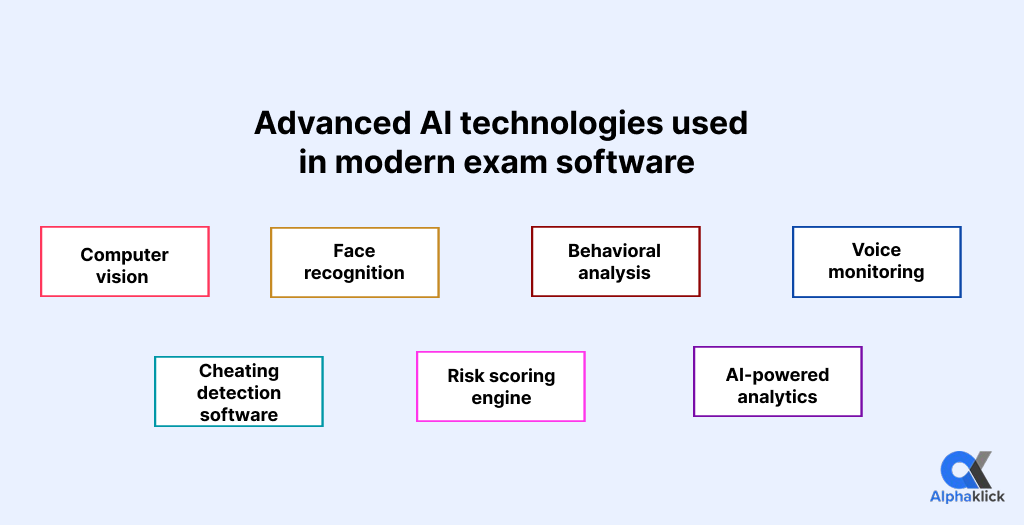
Artificial Intelligence plays a critical role in improving online exam proctoring, online assessment security, and automated fraud detection. These technologies help institutions monitor exams more accurately and efficiently at scale.
| AI Technology | Purpose |
| Computer vision | Monitors candidate movements, posture, and screen activity through webcam analysis |
| Face recognition | Verifies candidate identity before and during the exam |
| Behavioral analysis | Detects unusual actions and suspicious exam behavior patterns |
| Voice monitoring | Identifies conversations and unauthorized audio activity |
| Cheating detection software | Automatically flags potential exam violations in real time |
| Risk scoring engine | Assigns risk levels based on candidate activity and proctoring incidents |
| AI-powered analytics | Generates exam insights, security reports, and performance trends |
AI is transforming more than online exams. Learn how schools and universities use AI automation in educational institutions to streamline academic and administrative workflows.
Step-by-step process to build secure online exam software with anti-cheating features
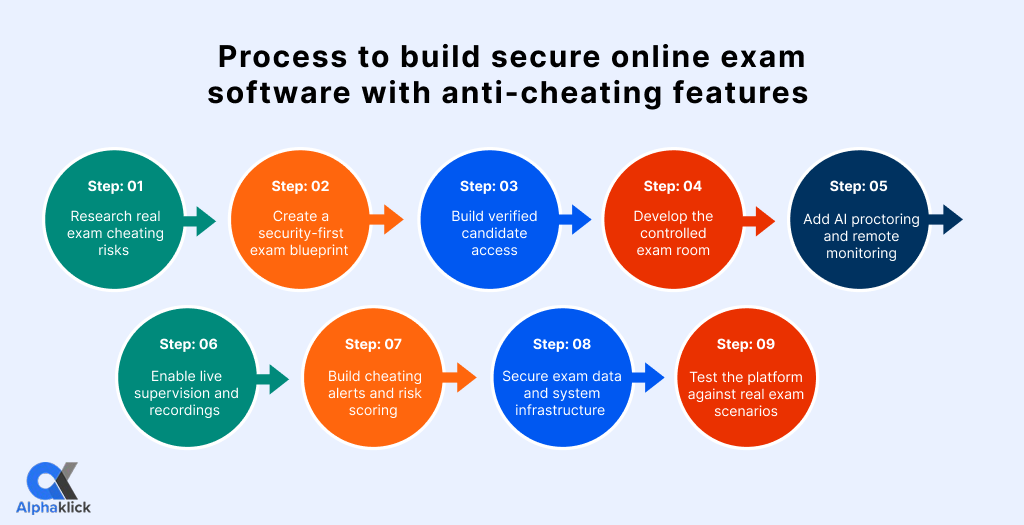
Step 1: Research real exam cheating risks
Start by understanding how cheating can happen in your exam environment. This includes candidate impersonation, browser switching, screen sharing, use of AI tools, multiple device usage, and question leakage. This research helps define the right online test security rules before development begins.
Step 2: Create a security-first exam blueprint
Plan the complete exam journey from candidate registration to result generation. Decide how candidates will log in, verify their identity, access the exam, get monitored, submit answers, and receive results. This blueprint becomes the foundation for building secure online exam software.
Tech stack: React, Next.js, Angular, Node.js, Java, .NET
Step 3: Build verified candidate access
Add secure login, OTP verification, facial recognition, ID validation, and role-based access control. This ensures only authorized candidates, proctors, instructors, and administrators can access the right part of the platform.
Tech stack: Firebase Auth, Auth0, AWS Cognito, Face Recognition APIs
Step 4: Develop the controlled exam room
Create a restricted digital exam environment where candidates cannot open new tabs, copy content, take screenshots, print questions, or access external websites. A secure browser for exams or browser lockdown exam software helps keep candidates inside the exam window.
Tech stack: Secure browser, JavaScript event tracking, browser lockdown tools
Step 5: Add AI proctoring and remote monitoring
Integrate AI proctoring software to monitor face movement, eye direction, multiple faces, background noise, and suspicious behavior during the exam. This strengthens remote exam monitoring without depending only on manual supervision.
Tech stack: TensorFlow, OpenCV, AWS Rekognition, Google Vision AI, Azure AI Vision
Step 6: Enable live supervision and recordings
Add live proctoring, webcam monitoring, microphone monitoring, screen monitoring, and recorded exam sessions. This allows proctors to review candidate behavior in real time and use recordings later for audits or dispute resolution.
Tech stack: WebRTC, Socket.IO, cloud video storage
Step 7: Build cheating alerts and risk scoring
Create automated alerts for suspicious activities such as repeated face movement, candidate mismatch, second screen usage, background voice detection, or frequent tab activity. A risk scoring system helps administrators quickly identify high-risk exams for manual review.
Tech stack: AI models, event tracking engine, analytics dashboard
Step 8: Secure exam data and system infrastructure
Protect exam questions, candidate data, answers, reports, and recordings using encryption, access logs, secure hosting, automated backups, and disaster recovery. This ensures strong online assessment security and protects sensitive information from data breaches.
Tech stack: AWS, Azure, Google Cloud, PostgreSQL, MongoDB, encryption APIs
Step 9: Test the platform against real exam scenarios
Before launch, test the platform against real cheating attempts and technical failures. Check browser bypass attempts, fake candidate logins, video lag, server load, data security, proctoring accuracy, and system performance under high traffic.
Tech stack: Penetration testing tools, load testing tools, QA automation tools
Cost of online exam software development
The cost of secure online exam software depends on features, security requirements, AI proctoring capabilities, and platform scalability.
| Platform Type | Estimated Cost |
| Basic online exam software | $10,000 – $25,000 |
| Online exam software with proctoring | $25,000 – $60,000 |
| AI-powered secure exam platform | $60,000 – $150,000+ |
Advanced features such as AI proctoring, browser lockdown, and remote exam monitoring typically increase development costs.
Planning a complete digital learning solution? Explore our guide on eLearning mobile app development to understand key features, costs, and development considerations.
Why choose Alphaklick for online exam software development
A successful online exam platform is built on trust, security, and scalability. At Alphaklick, we combine our expertise in education software development with advanced proctoring, exam security, and anti-cheating technologies to create reliable digital assessment platforms.
From online exam software and LMS platforms to custom eLearning solutions, we help schools, universities, certification providers, and enterprises deliver secure examinations with confidence.
Let’s build a more secure assessment experience
Book a free consultation with Alphaklick and explore how we can turn your online examination idea into a secure, scalable, and high-performing platform.
Frequently asked questions
Question: How can I prevent cheating on online exams?
Answer: You can prevent cheating by using identity verification, AI proctoring, browser lockdown, webcam and microphone monitoring, device tracking, and secure question randomization.
Question: How to create online exam software?
Answer: To create online exam software, define exam workflows, build candidate and admin modules, add question banks, integrate proctoring features, secure the platform, and test it for scalability and security.
Question: What is anti-cheating software?
Answer: Anti-cheating software is a system that helps detect and prevent unfair activities during online exams using AI monitoring, browser restrictions, identity checks, and activity tracking.
Question: Can online tests detect cheating?
Answer: Yes, online tests can detect cheating when they use AI proctoring, live monitoring, face recognition, screen tracking, browser lockdown, and suspicious behavior alerts.