A daycare owner called last month with one question: “We’re still using paper sign-in sheets and a spreadsheet for billing; what would it cost to get a mobile app like Brightwheel built for us?”
The honest answer is: it depends, but there’s a real number behind it.
This guide walks through what goes into the cost to build a custom child care mobile app, feature breakdowns, platform and region pricing, market data, and a project example, so you can budget with confidence before your first vendor call.
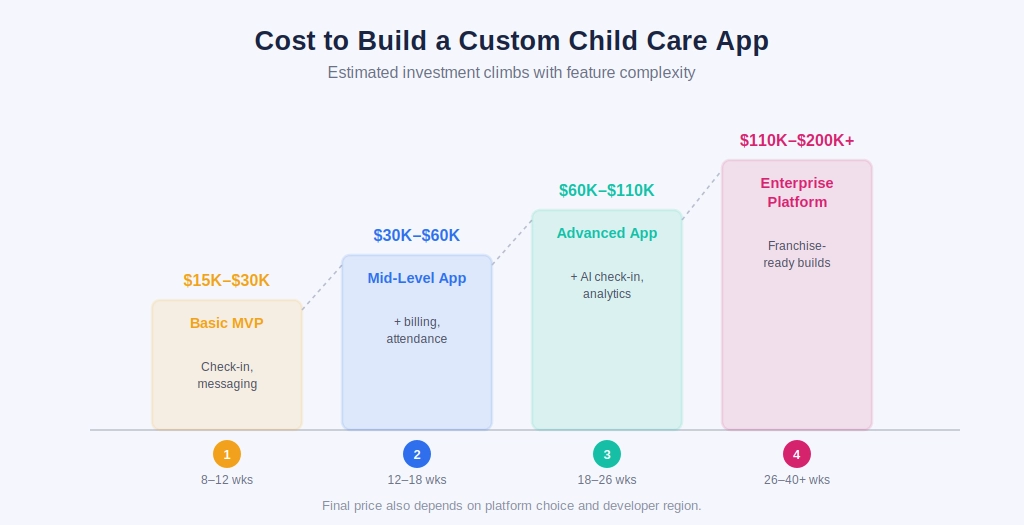
Cost to Build a Custom Child Care and Day Care App: Quick Overview
The day care mobile app development cost depends mainly on three things: how many features you need, which platforms you’re building for, and where your mobile app development team is based.
| App Type | Core Features | Estimated Timeline | Estimated Cost (USD) |
|---|---|---|---|
| Basic MVP | Check-in/out, messaging, photo sharing | 8–12 weeks | $15,000 – $30,000 |
| Mid-level App | MVP features + billing, attendance, staff app | 12–18 weeks | $30,000 – $60,000 |
| Advanced App | Mid-level + AI check-in, analytics, multi-center support | 18–26 weeks | $60,000 – $90,000 |
| Enterprise Platform | Full suite for franchise chains, custom integrations | 26–40+ weeks | $90,000 – $200,000+ |
Platform choice shifts these numbers too. Here’s how the same mid-level feature set typically prices out depending on what you build:
| Platform Approach | Best For | Relative Cost Impact | Estimated Cost Range |
|---|---|---|---|
| Native, single platform (iOS or Android only) | Centers with a mostly one-OS parent base | Baseline | $25,000 – $50,000 |
| Native iOS + Android (separate codebases) | Large chains needing platform-specific performance | +30–40% | $45,000 – $80,000 |
| Cross-platform (React Native / Flutter) | Most daycare centers, one codebase, two app stores | −25–30% vs. dual native | $30,000 – $60,000 |
| Cross-platform + Web Admin Dashboard | Multi-center operators needing browser reporting | +$8,000 – $20,000 | $38,000 – $80,000 |
Where your mobile app development team sits changes the number just as much:
| Development Region | Typical Hourly Rate | Estimated Cost for a Mid-Level App | Typical Trade-off |
|---|---|---|---|
| United States / Western Europe | $100 – $180/hr | $65,000 – $110,000 | Higher cost, easier in-person collaboration |
| Eastern Europe | $50 – $80/hr | $40,000 – $70,000 | Strong technical talent, moderate cost |
| India | $25 – $50/hr | $30,000 – $55,000 | Lower cost, large talent pool, proven track record in compliance software |
| Southeast Asia | $20 – $40/hr | $25,000 – $50,000 | Lowest cost, variable compliance experience |
This is why custom childcare mobile app development pricing so often turns into a build-local-vs-outsource decision; the feature list barely changes, but the invoice can shift by tens of thousands depending on where the team sits.
If you’re considering India for your project, you can also explore our list of top mobile app development companies in India to compare potential development partners based on expertise, services, and industry experience.
Market Demand: Why This Category Is Growing
The push toward digital child care tools shows up clearly in labor and market data.
| Data Point | Figure | Source |
|---|---|---|
| Global childcare management software market (2024) | ~$221.6 Million | Allied Market Research |
| Projected market size by 2032 | ~$393.6 Million (CAGR 7.5%) | SNS Insider Market Report |
| Cloud-based childcare software share of market (2024) | ~70% | IMARC Group |
The pattern is consistent: more working parents, more centers moving off paper, and cloud-based tools becoming the default.
This is why child care management software cost is increasingly treated as a standard operating expense, not a “nice to have.”
What is a Child Care or Day Care App, Exactly?
At its core, a child care mobile app connects parents, teachers, and administrators on one shared data layer. Parents get updates and handle payments. Staff log attendance, meals, naps, and incidents.
Administrators track enrollment, staffing, and billing. It’s less a single mobile app and more a small connected ecosystem.
Types of Child Care Apps You Can Build
- Parent-facing app: check-in/out, daily updates, messaging, invoices
- Staff/teacher app: attendance, activity notes, incident reports
- Admin dashboard: enrollment, staffing, billing, reporting
- Multi-center franchise platform: all of the above, scaled across locations
- Babysitting or nanny marketplace app: matching, scheduling, payments
The cost to develop a babysitting app is usually a touch lower than a full daycare platform since it skips ratio tracking, but adds complexity around background checks and payments, expect $15,000–$30,000 for a solid first release.
Must-Have Features and What They Cost
| Feature | Purpose | Relative Development Effort |
|---|---|---|
| QR/RFID check-in & check-out | Fast, contactless attendance tracking | Medium |
| Real-time photo & activity feed | Keeps parents updated during the day | Medium |
| Attendance & staff-ratio tracking | Compliance with licensing rules | Medium |
| Billing, invoicing, auto-pay | Reduces late payments and admin work | High |
| Meal, nap, and diaper logs | Daily care documentation | Low |
| Push notifications & messaging | Direct parent-teacher communication | Low |
| Emergency alerts & contactless pickup | Safety and authorized pickup verification | Medium |
| Waitlist & enrollment management | Handles new sign-ups and openings | Medium |
Billing is usually the most expensive single feature since it needs payment gateway integration, recurring logic, and thorough testing.
Advanced and AI-Powered Features
Once the core mobile app is stable, many centers layer in smarter capabilities:
- AI-based facial recognition check-in: matches a child’s face against a stored profile at drop-off, cutting check-in to seconds while flagging mismatches for staff review.
- Predictive enrollment and staffing analytics: forecasts busy seasons from historical attendance, helping directors plan schedules and avoid ratio violations.
- AI-powered parent chatbots: trained on center-specific policies to answer routine questions instantly, without pulling staff off in-person tasks.
- Automated incident and health alerts: flags patterns like repeated late pickups or unusual absence streaks for proactive follow-up.
- Smart billing reconciliation: matches payments against invoices automatically and flags discrepancies before they become disputes.
These features raise the custom childcare app budget by roughly $15,000–$40,000, depending on model complexity and whether facial recognition needs on-device processing for privacy. For a broader breakdown of AI-related development expenses, see our guide to AI mobile app development cost in 2026.
Compliance and Safety Requirements
Child care mobile apps handle sensitive children’s and family data, so security and compliance should be built in from the beginning.
- COPPA & FERPA: Ensure proper parental consent and secure education records. For a deeper look at what to verify when hiring a compliant development partner, see our guide to HIPAA and FERPA-compliant app development.
- State Regulations: Support licensing, attendance, incident reporting, and retention requirements.
- Background Checks: Enable fingerprinting and child-abuse registry verification.
- Data Security: Use encryption, RBAC, and secure authentication.
- Audit & Reporting: Track sensitive-data access and support incident reporting.
- Biometric Privacy: Follow applicable laws such as BIPA when using facial recognition.
- Data Retention: Apply state-specific retention and deletion policies.
Building compliance early helps avoid costly redesigns, audit issues, and regulatory penalties.
Tech Stack Commonly Used
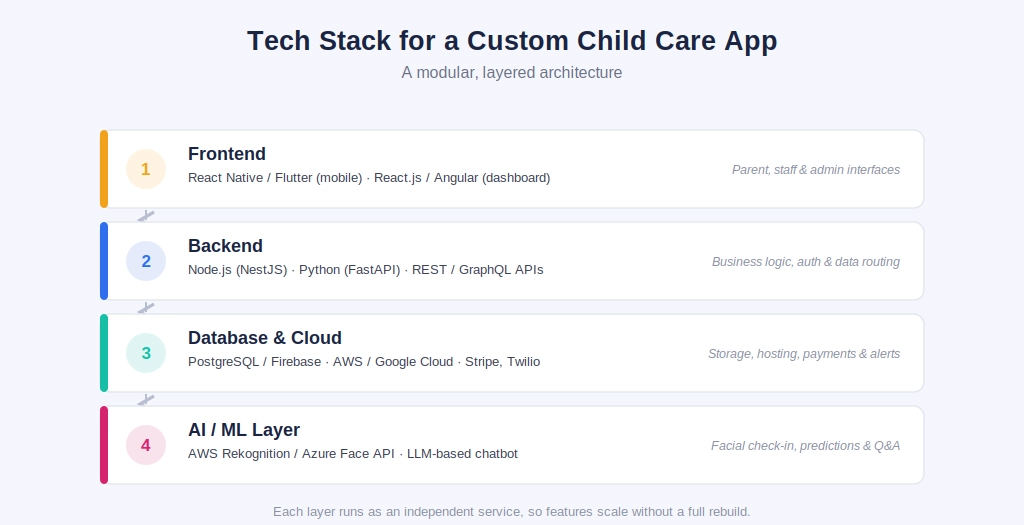
- Frontend (mobile): React Native or Flutter, shared codebase across iOS and Android. Choosing the right framework can significantly affect development time, scalability, and cost; our guide to cross-platform app frameworks compares the main options for modern mobile development.
- Frontend (dashboard): React.js or Angular for the browser-based admin interface.
- Backend: Node.js (Express/NestJS) or Python (Django/FastAPI) for business logic and REST/GraphQL APIs.
- Database: PostgreSQL or MySQL for billing records; Firebase Firestore or MongoDB for real-time syncing like live photo feeds.
- Cloud infrastructure: AWS or Google Cloud Platform, with object storage and CDN delivery for media.
- Authentication & security: OAuth 2.0 or Firebase Auth, plus end-to-end encryption for child-identifiable data.
- Third-party integrations: Stripe for payments, Twilio and Firebase Cloud Messaging for alerts, background-check APIs for staff.
- AI/ML tools: AWS Rekognition or Azure Face API for facial-recognition check-in, OpenAI or Anthropic APIs for the chatbot layer, and scikit-learn or AWS Forecast for predicting enrollment and staffing patterns.
- DevOps: CI/CD pipelines (GitHub Actions) with Docker for consistent staging and production environments.
This stack is modular; each layer scales independently as an MVP grows into a multi-location platform. AI modules are usually built as separate microservices, so a center that doesn’t want facial-recognition check-in simply doesn’t license that piece.
Step-by-Step Development Process
Building a daycare mobile app isn’t the same as building a generic booking mobile app, the data model has to account for guardian relationships, ratio compliance, and offline reliability from day one:
- Domain modeling and ratio-compliance mapping: before writing code, the mobile app development team in India maps relationships unique to child care: multiple guardians per child (with different pickup permissions), staff-to-child ratios that vary by age group and state, and center-specific licensing fields. This becomes the core entity-relationship diagram: child, guardian, classroom, staff, ratio rule.
- Attendance state machine design: check-in/check-out is modeled as a state machine (checked-out → checked-in → in-transition-between-rooms → checked-out) so the system can enforce ratio limits per classroom in real time and flag a violation the moment a room exceeds licensed capacity.
- UI/UX prototyping with real end users: Figma prototypes are tested with front-desk staff (who need speed during drop-off rush) and parents (who need clarity, not clutter) as two distinct user groups.
- Offline-first architecture for the staff app: many centers have unreliable classroom wifi, so the staff mobile app typically uses local-first storage (WatermelonDB or Realm) that queues attendance and activity logs and syncs once connectivity returns.
- Backend and multi-tenancy setup: the schema is built multi-tenant from the start, even for a single center, so a franchise operator can onboard new locations later without a migration. APIs are versioned early to avoid breaking the mobile apps during updates.
- Billing engine and reconciliation logic: recurring billing runs on a proration engine (mid-month enrollments, withdrawals, sibling discounts) integrated with Stripe’s subscription APIs, plus a nightly job matching payments to invoices.
- AI module integration: facial-recognition check-in and the chatbot layer are built as isolated microservices; the facial-recognition model is benchmarked for the variability in children’s faces, since most off-the-shelf models are tuned mainly on adult datasets.
- Compliance testing and phased rollout: beyond standard QA, this includes a mock state licensing audit export (attendance logs, ratio compliance history, staff certifications), followed by a launch starting with one classroom or center before it goes network-wide, with usage data reviewed in the first 60–90 days to catch friction points early.
Case Study: How BloomNest Early Learning Digitized Child Care Management
Client: BloomNest Early Learning, a daycare chain with five centers, serving roughly 420 enrolled children.
Client Issue: Attendance ran on paper sign-in sheets, and billing sat in a shared spreadsheet updated manually. Parents had no visibility into their child’s day until pickup, and staff spent close to two hours daily reconciling attendance against invoices.
Client Wants: One system to replace paper attendance across all five centers, give parents real-time updates without front-desk calls, automate billing, and give the owner one dashboard for enrollment and revenue.
Client Solution: A three-part build, a parent mobile app for check-in visibility, messaging, and auto-pay; a staff mobile app for QR-code attendance and daily logs; and an admin dashboard consolidating billing and enrollment. Built on React Native, a Node.js backend, and Stripe, at the mid-level cost tier described earlier.
Development Timeline: Discovery and design: 3 weeks. Core development: 9 weeks. Integration and QA: 3 weeks. Phased rollout: 1 week. Total: 16 weeks kickoff to launch.
Client Results: Billing reconciliation dropped from roughly two hours a day to under twenty minutes within two months. Parent satisfaction improved in post-enrollment surveys, and recurring attendance errors were eliminated once paper sign-in was retired.
What an Industry Expert Says
“The centers that get the most out of these mobile apps treat them as a daily communication and compliance tool first, not a marketing add-on. I’ve seen projects fail not because the technology was bad, but because the app tried to do too much on day one instead of nailing check-in, billing, and updates.” — Supriya Nair, Child Care Technology Consultant
How to Choose the Right Mobile App Development Partner
A few checks before signing a contract: ask for past work in child care, education, or healthcare software; confirm they understand COPPA and state licensing rules; get an itemized quote by feature, not a lump sum; and check whether post-launch support is included.
Many businesses in this space work with a mobile app development company in India, largely because the cost-to-quality ratio tends to be strong.
Teams with experience as a healthcare mobile app development company in India often transfer well into child care software too, since both fields share sensitive data handling and compliance-driven architecture.
If you’re scoping a project like this, Alphaklick Solutions works with child care, education, and healthcare businesses on custom app builds like the one outlined here, from MVP through multi-center platforms. You can book a free consultation to get a project-specific quote.
Frequently Asked Questions
Question: How much does a child care mobile app like Brightwheel cost to build?
Answer: A comparable child care app like Brightwheel cost typically falls in the $20,000–$50,000 range for a full-featured version.
Question: Is a custom mobile app cheaper than a subscription tool long-term?
Answer: Subscription tools cost less upfront but add up over years and limit customization. A custom build costs more initially but has no recurring per-center license fees.
Question: What ongoing costs should I expect after launch?
Answer: Budget roughly 15–20% of the initial childcare mobile app development cost per year for hosting, maintenance, and updates.
Question: How long does it take to build a daycare management app?
Answer: A basic MVP takes 8–12 weeks; a mid-level build like the case study above typically takes 14–18 weeks.
Question: Do I need a separate app for staff, or can parents and staff share one app?
Answer: Most centers use two separate apps with different permission levels; a combined mobile app tends to clutter the parent experience with admin features they don’t need.