Rohan submitted his salon-booking app to the App Store, poured a coffee, and waited. Two days later: “Guideline 2.1 — App Rejected.” No warning, no context, just a founder staring at a red banner, wondering what he’d missed.
He’s not alone. Even in 2026, with AI-assisted review on both platforms, thousands of apps bounce back every day, often for technical reasons that take minutes to fix once you know exactly what triggered them.
Here are the real app store rejection reasons 2026 and Google Play app rejection common reasons, broken down technically, plus what our team recommends fixing before you resubmit.
How the App Review Process Works (App Store vs Google Play)
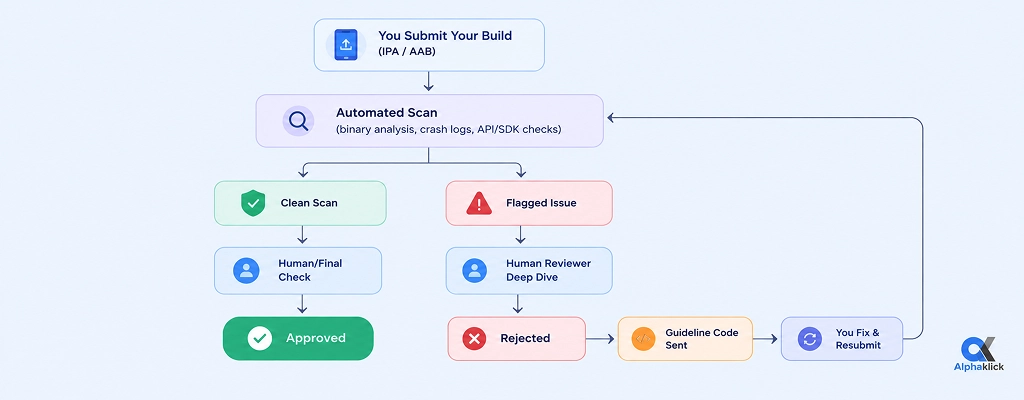
Apple leans on human reviewers following the App Store Review Guidelines, backed by automated scans for binary analysis, crash detection, and API usage checks.
Google Play relies more on automated, AI-driven scanning, static analysis of the APK/AAB, dynamic testing on emulator farms, and Play Protect scanning, pulling in humans only for flagged or high-risk apps.
Flowchart: The App Review Journey
| Factor | Apple App Store | Google Play |
|---|---|---|
| Review type | Mostly human, guided by numbered guidelines | Mostly automated/AI, human for flagged apps |
| Build format | .ipa via App Store Connect | .aab via Play Console |
| Average review time (2026) | 24–48 hours | A few hours to 2–3 days |
| Guideline document | App Store Review Guidelines | Google Play Developer Policy |
| Appeal process | App Review Board / Resolution Center | Play Console appeal form |
Apple flags issues with specific numeric guideline codes (e.g., 2.1, 4.3, 5.1.1); Google Play flags issues against named policy categories in the Play Console’s Policy status tab.
Both platforms retain a submission history tied to your developer account, so a flagged bundle ID or package name gets extra automated scrutiny on future uploads.
10 Common Reasons Apps Get Rejected
This is where Rohan’s story, and probably yours, really begins.
1. Incomplete or Misleading App Information (Guideline 2.3)
Reviewers can’t approve what they can’t functionally test. Broken deep links, expired demo credentials, or a login screen requiring 2FA with no bypass are enough to trigger this rejection; one fitness app’s guest-mode button once called an API endpoint that returned a 404, leaving reviewers staring at a blank screen.
Our team recommends: provide a persistent test account with no OTP dependency, verify every deep link resolves in the production build, and confirm your store listing matches the actual build version.
2. Broken Functionality, Bugs & Crashes on Submission (Guideline 2.1 / Stability Policy)
Crashes, bugs, and incomplete app rejections are usually caught via crash logs or Android’s ANR reports, triggered when the main thread is blocked for 5+ seconds. It’s common for an app to run fine on a newer device and crash instantly on an older one running a slightly different OS version.
Our team recommends: test against your declared minimum OS version, keep crash and ANR rates under 0.5%, and run a memory leak check before every submission.
3. Privacy Policy & Data Collection Violations (Guideline 5.1.1 / Data Safety Policy)
Apple’s Privacy Nutrition Labels and Google’s Data Safety form are cross-checked against actual SDK network calls during automated scanning, so an analytics SDK quietly transmitting device identifiers without being disclosed is an instant flag.
Our team recommends: audit every third-party SDK for the data it actually sends, keep permission purpose strings specific rather than generic, and update your Data Safety form the moment an SDK changes.
4. Poor UI/UX or Design Guideline Violations (Guideline 4.0)
Apple requires a minimum 44×44pt tap target, and Google’s Material Design requires 48×48dp, and both check for safe-area handling and gesture conflicts; a custom edge-swipe that overrides the phone’s native back-gesture is a classic example.
Our team recommends: respect safe area insets and native gesture zones, meet minimum tap-target sizing, and support dark mode and dynamic font scaling.
5. Inappropriate or Restricted Content (Guideline 1.1 / 1.2)
Apps with user-generated content specifically need a filtering system, a reporting mechanism, and a way to block abusive users; a social app with no report/block function can get rejected over a single unmoderated post, even if the core product is fine.
Our team recommends: build in UGC moderation with a report/block flow, and set your age rating from the actual content questionnaire rather than a default value.
6. Guideline 4.3 “Spam” or Duplicate/Low-Value Apps
Both platforms compare bundle IDs, binary hashes, and UI templates across a developer’s submissions to catch near-duplicates; three near-identical “calculator” apps with different icons but the same underlying binary will all get pulled together.
Our team recommends: give every app a genuinely distinct feature set and codebase, and never resubmit a rejected binary under a new name unchanged.
7. In-App Purchase & Payment Policy Violations (Guideline 3.1.1)
Digital goods must route through StoreKit on iOS or the Play Billing Library on Android; any checkout flow that opens a WebView linking to an external payment gateway for digital content gets flagged automatically during static analysis.
Our team recommends: keep all digital-goods purchases inside the official billing systems, and if you qualify for the “reader app” exception, document it clearly in your review notes.
8. Misuse of Permissions (Runtime Permissions / ATT Framework)
Both iOS’s App Tracking Transparency framework and Android’s runtime “dangerous permissions” require a justified, in-context prompt rather than a blanket request at launch; a note-taking app asking for microphone access it never uses anywhere is an easy flag.
Our team recommends: request permissions at the point of use, strip unused permission declarations from your manifest, and pair each request with a clear purpose string.
9. Intellectual Property & Trademark Infringement (Guideline 5.2)
Reviewers cross-check icons, fonts, and UI assets against known trademark databases; a free stock icon pack that quietly bundles a trademarked sports logo is a common, often accidental, trigger.
Our team recommends: source assets only from licensed libraries with commercial-use rights, and keep license documentation on file for everything used in the build.
10. Metadata Manipulation (Guideline 2.3.7 / Metadata Policy)
Keyword-stuffed titles and screenshots that don’t match the live build get caught through automated text analysis and visual diffing against the actual binary, like a store screenshot showing a “premium dashboard” that doesn’t exist anywhere in the shipped code.
Our team recommends: generate screenshots directly from the current production build, and keep your title and keywords natural rather than comma-stuffed.
| # | Rejection Reason | Guideline/Policy Ref | Quick Fix |
|---|---|---|---|
| 1 | Incomplete app info | Guideline 2.3 | Provide a persistent, working demo login |
| 2 | Crashes & bugs | Guideline 2.1 / Stability | Test against min. OS version; monitor crash/ANR rate |
| 3 | Privacy policy mismatch | Guideline 5.1.1 / Data Safety | Match Data Safety form to actual SDK network calls |
| 4 | Poor UI/UX | Guideline 4.0 | Meet min. tap-target size; respect safe areas |
| 5 | Inappropriate content | Guideline 1.1/1.2 | Add UGC moderation + correct age rating |
| 6 | Spam/duplicate app | Guideline 4.3 | Ensure a distinct codebase and feature set |
| 7 | Payment violation | Guideline 3.1.1 | Use StoreKit / Billing Library only |
| 8 | Permission misuse | ATT / Runtime permissions | Request contextually; remove unused declarations |
| 9 | IP infringement | Guideline 5.2 | Use licensed assets with documented rights |
| 10 | Metadata manipulation | Guideline 2.3.7 | Screenshots must match the shipped build |
New/Emerging Rejection Triggers in 2026
- AI-generated content disclosure: apps using generative AI or LLM-based features now require in-app labeling wherever AI output is surfaced to the user.
- Data safety label mismatches are one of the fastest-growing Google Play policy violations and fixes; Google’s automated SDK scanner cross-checks declared data types against actual outbound network traffic captured during dynamic analysis.
- Account deletion requirements: apps with account creation must expose an in-app deletion flow that triggers actual backend data removal, not just a support-ticket workaround.
How to Avoid Rejection: A Pre-Submission Checklist
Use this as your App Store & Play rejection checklist: audit your build against the top 2026 compliance triggers before you submit.
| Category | What to Check |
|---|---|
| QA & Testing | Crash/ANR rate under 0.5%; tested on min. supported OS version |
| Compliance | Data Safety form matches actual SDK network calls |
| Store Listing | Screenshots generated from the current production build |
| Permissions | Runtime permissions requested contextually, unused ones removed |
| Payments | Digital goods routed through StoreKit / Billing Library |
| Account Handling | In-app deletion flow triggers real backend data removal |
If even one row is unchecked, fix it before you submit, not after you get rejected.
What to Do If Your App Gets Rejected
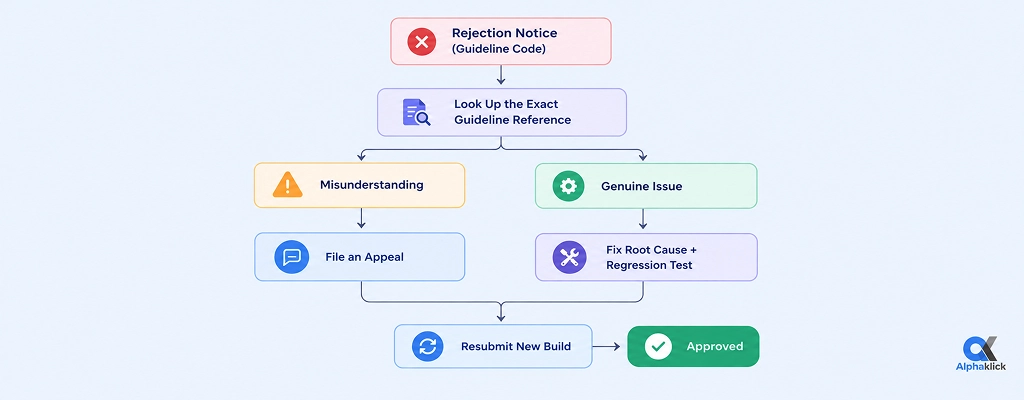
A rejection notice isn’t the end; it’s data. How you respond in the next 24 hours often decides whether your next submission clears review or bounces back again.
Flowchart: From Rejection to Resubmission
Rohan’s app went live nine days after his first rejection.
The cause? A location permission added late in testing that was never reflected in the Data Safety form. One mismatched declaration, one rejection, one lesson learned.
What a Professional Mobile App Development Team Checks Before Submission
Most rejections aren’t about the app being bad; they’re small, technical gaps: an undeclared SDK, an unused permission, a screenshot that doesn’t match the shipped binary.
A skilled mobile app development team in India runs this audit long before the app reaches Apple or Google: static analysis for unused permissions, SDK network-traffic auditing against the Data Safety form, and a build-vs-listing consistency check, catching exactly what reviewers look for, earlier and internally.
Don’t let a preventable rejection delay your launch. Book a free consultation and get your app review-ready from day one.
FAQs
Question: How long does an App Store review take in 2026?
Answer: Typically 24–48 hours, though submissions involving payments, health data, or AI features can take a few days longer.
Question: Can I resubmit immediately after rejection?
Answer: Yes, once the flagged issue is genuinely fixed at the code/config level, repeated rejections for the same guideline slow down future automated scans.
Question: Does Google Play reject apps as often as Apple?
Answer: Both reject a similar share of first-time submissions; Apple’s human review focuses on design and functionality, Google Play’s automated scanning focuses on data safety and SDK compliance.
Question: Will one rejection affect my developer account?
Answer: No, but repeated violations tied to the same bundle ID/package name can lead to account-level warnings or suspension.
Question: Do AI-powered app features need special disclosure in 2026?
Answer: Yes, both stores require clear in-app labeling wherever AI generates content or drives a core feature.