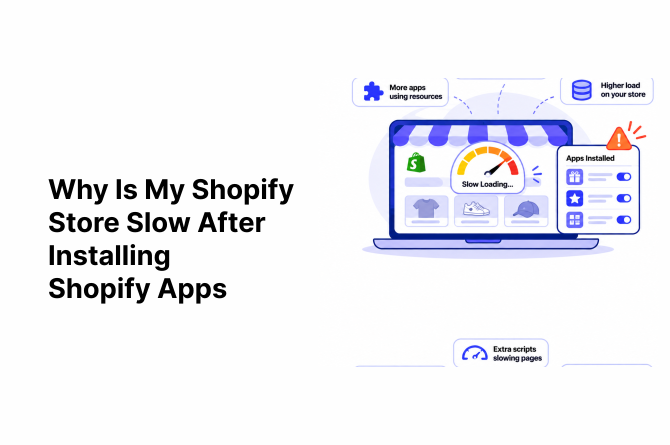
Most Shopify store owners I talk to don’t add a Shopify app without a reason. Each one fixes a real problem. Reviews help people trust the brand, a popup collects emails, and a chat box answers questions at midnight. The trouble comes later. The homepage starts taking a few extra seconds to open on a phone, and nobody can say which change caused it.
My team at AlphaKlick fixes this kind of problem often, and it is rarely one bad Shopify app behind it. Here is how a Shopify store gets slower one install at a time, and how we find the cause.
Why Is My Shopify Store Slow After Installing Shopify Apps? The Short Answer
Most Shopify apps add JavaScript, CSS, fonts, or tracking code to your theme. Many of them load on every page, even on pages where the feature is not used at all. Each file is one more thing the browser has to download before shoppers can use the page. Ten small Shopify apps can easily make a Shopify store slow, mainly on mobile data, where every extra file takes longer to load.
How a Shopify App Adds Weight to Your Shopify Store
I explain this to Shopify merchants with a simple example. Think of your theme as a house, and every Shopify app as a piece of furniture. Some pieces sit only in the room that needs them. Others end up in every room.
1. Scripts That Load on Every Page
A reviews widget is only needed on product pages, yet many review Shopify apps load their script on every page. When five or six Shopify apps work like this, the browser stays busy all the time, and taps or scrolls start to feel late.
2. Code Added Straight Into Theme Files
Older Shopify apps often write their code directly into theme files such as theme.liquid or product templates. That code stays there until someone removes it by hand. Newer Shopify apps mostly use Shopify’s theme app extensions instead. You can turn them off from the theme editor.
3. Outside Requests, Fonts and Tracking Pixels
Many Shopify apps connect to their own servers to load settings, custom fonts, or tracking pixels. Each one is a separate request to a different website, and on a slow 4G connection these requests pile up quickly. The huge choice of Shopify apps is one reason Shopify merchants pick Shopify, and our Shopify vs WooCommerce comparison explains that side in detail.
Signs That a Shopify App Is Behind the Slowdown
The question “why is my Shopify store slow” usually starts with a feeling, not a testing tool. A Shopify merchant opens their own product page on a phone, and it just feels heavy. These are the signs I look for first:
- Product pages open slower than they did before a recent Shopify app install
- The add to cart button reacts late, or the cart drawer takes a moment to open
- Content jumps around while the page loads, usually because a banner or widget pushes things down
- Mobile feels much slower than desktop on the same page
If two or more of these match, there is a good chance a Shopify app is the cause. A Shopify store slow on mobile but fine on desktop is something I see very often. Phones have less power than laptops, and scripts run slower on them.
How to Check Your Shopify Speed Score and Core Web Vitals
You need real numbers before you remove anything. Shopify used to show a single Shopify speed score in the admin. Most Shopify admins now show a Web performance report under Analytics instead. It uses data from real visitors, which makes it the closest picture of what shoppers go through.
1. Reading the Web Performance Report in Shopify Admin
The report tracks three Shopify Core Web Vitals. Largest Contentful Paint shows how fast the main content appears. Interaction to Next Paint shows how fast the page responds to a tap. Cumulative Layout Shift shows how much the layout moves around while loading. Google sets the limits below in its Core Web Vitals guidance.
| Metric | What It Measures | Good | Needs Work | Poor |
|---|---|---|---|---|
| Largest Contentful Paint (LCP) | Time for the main image or text to appear | 2.5 seconds or less | 2.5 to 4 seconds | Over 4 seconds |
| Interaction to Next Paint (INP) | Time for the page to respond to a tap or click | 200 ms or less | 200 to 500 ms | Over 500 ms |
| Cumulative Layout Shift (CLS) | How much content moves while loading | 0.1 or less | 0.1 to 0.25 | Over 0.25 |
In my experience, Shopify apps hurt INP the most. Their scripts keep the browser busy right when a shopper taps something.
2. Testing Pages With PageSpeed Insights and Chrome DevTools
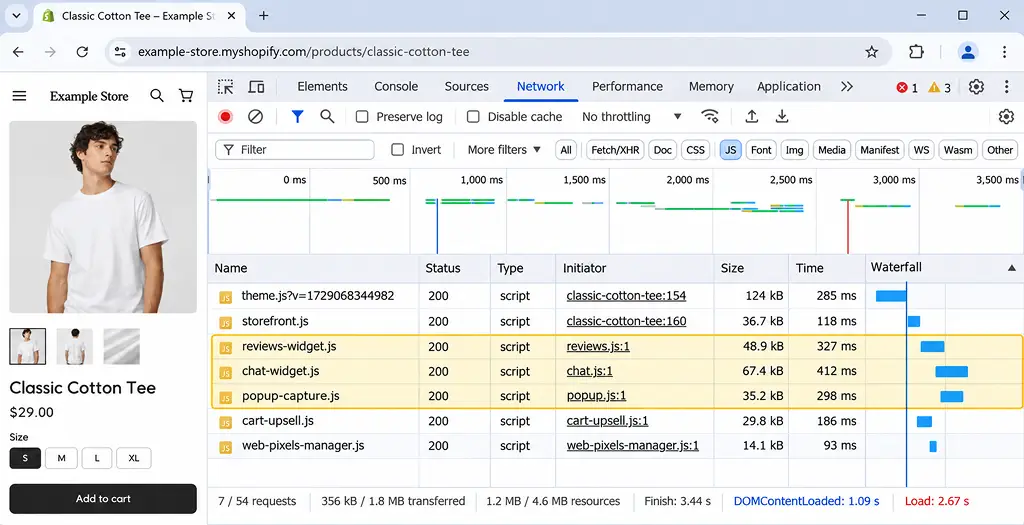
PageSpeed Insights gives a test score for any single page. I use it to check Shopify page speed on the homepage and one product page. In Chrome DevTools, open the Network tab and filter by “JS”. It lists every script the page loads, and the website names next to each file usually tell you which Shopify app it belongs to.
3. Comparing Results Before and After Installing a Shopify App
I always ask Shopify merchants to test three main pages before installing any new Shopify app, and then test them again a day later. One test can go up or down by several points on its own. Run each test three times and take the middle result.
Shopify App Types That Usually Cause the Most Slowdown
Not every Shopify app adds the same weight. In the Shopify projects my team has checked, these types come up as the heaviest again and again.
| Shopify App Type | What It Usually Loads | Pages Affected | Usual Impact |
|---|---|---|---|
| Product reviews | Widget script, styles, star images | Often every page | Medium |
| Popups and email capture | Script, fonts, images, timers | Every page | Medium to high |
| Live chat | Large chat script, outside connection | Every page | High |
| Page builders | Extra CSS and JavaScript for layouts | Pages built with them | High |
| Translation and currency | Script that rewrites page text | Every page | Medium to high |
| Tracking and analytics | Several pixels and outside requests | Every page | Medium |
| Upsell and cart tools | Cart scripts, product data requests | Product and cart pages | Low to medium |
Live chat and page builders are the first ones I check. A chat box loads on every page, though few shoppers open it. Sometimes the better fix is to replace a heavy Shopify app with a small custom feature built into the theme. If speed matters to your sales, keep that in mind when you plan your Shopify website development cost.
Why Your Shopify Store Can Stay Slow After You Uninstall a Shopify App
Many Shopify merchants delete a Shopify app and see no change at all. Uninstalling a Shopify app removes its access to your admin. It does not always remove the code it added to your theme.
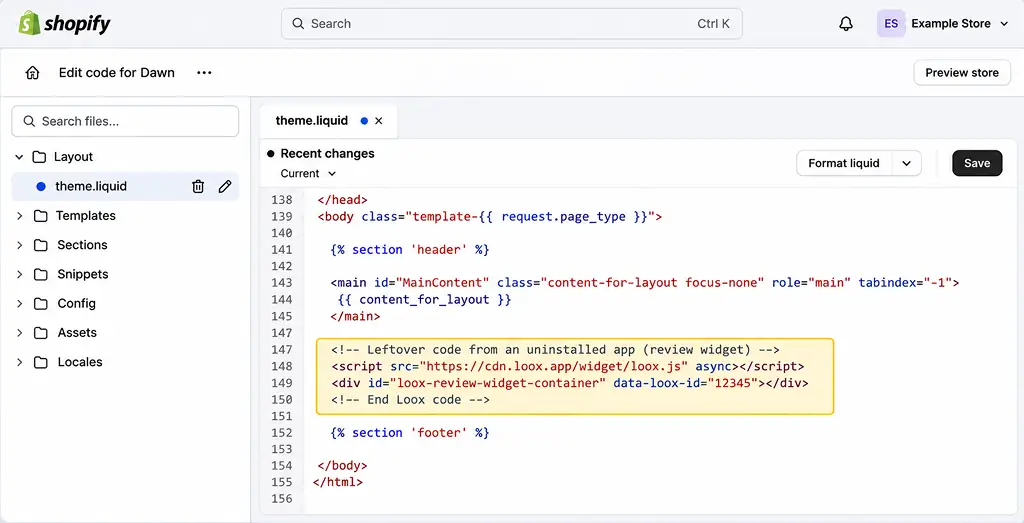
Where Leftover Shopify App Code Hides in Your Theme
When we clean up a theme, leftover code is usually found in the same few places:
- theme.liquid, often just before the closing head or body tag
- Snippet files named after the Shopify app, still being called by a template
- Product and cart templates with empty widget boxes
- Script tags pointing to the website of a Shopify app that is no longer installed
How to Remove It Safely Without Breaking the Theme
Copy your live theme first and work on the copy. Search the code for the Shopify app’s name or website, remove one piece at a time, and check the affected pages on mobile and desktop before you publish. If theme code feels unfamiliar, leave this to a developer, as one missing tag can break the layout.
How to Speed Up a Shopify Site Without Losing the Features You Need
Most Shopify merchants want the same features without the extra weight. If you are working out how to improve Shopify store speed while keeping the tools your team depends on, these are the steps my team follows.
1. Review Every Installed Shopify App
List every installed Shopify app, what it does, and when it last helped a sale. I usually find two or three that nobody remembers installing. Some were added for a one-time sale or a test and simply never removed. If a Shopify app hasn’t been used in the last few months, remove it and check the page speed again.
2. Replace Several Small Shopify Apps With One
Three separate Shopify apps for a countdown timer, a trust badge, and a stock counter can often be replaced by one. One Shopify app means one script instead of three. It also means fewer outside requests and one less monthly bill. Before switching, make sure the new Shopify app covers every feature you actually use.
3. Choose Shopify Apps Built on Theme App Extensions
Before installing anything new, check whether the Shopify app adds its features as blocks or embeds in the theme editor. You can turn those off anytime, and their code goes away when the Shopify app is uninstalled. You can usually see this on the Shopify App Store listing or by asking the Shopify developer before you install. It saves you from leftover code problems later.
4. Delay Scripts That Aren’t Needed Right Away
Chat boxes, popups, and review sliders lower on the page don’t need to load first. A Shopify developer can set them to load after the main content appears, or only when the shopper scrolls down. The product image and price show up faster, and these features still appear a second later. Most shoppers never notice the delay, but they do notice a page that opens quickly.
5. Move Tracking Pixels to Shopify Customer Events
Shopify’s Customer Events section lets you run tracking pixels in a separate, closed space. That stops them from slowing the main page. Pixels for Meta, Google, TikTok, and similar platforms can be added there instead of inside theme files. Ask your marketing team to test the tracking after the move, to make sure no sales data goes missing.
These steps speed up a Shopify site in most cases. Planning which Shopify apps you need early, while building an ecommerce website on Shopify, saves a lot more effort than cleaning things up later.
What a Shopify Speed Optimization Audit Looks Like on Our Side
I think Shopify merchants should know what a Shopify speed optimization audit includes before paying for one. Ours follows the same steps every time.
First, we note down the starting numbers for the homepage, one collection page, one product page, and the cart. Next, we match every script to a Shopify app and mark it as remove, replace, or delay. All changes go onto a copy of the theme. The final report shows the same pages before and after.
If you are comparing Shopify development companies in India, ask each one to show you a sample report like this before you sign anything.
When to Bring In a Shopify Developer
Removing unused Shopify apps and testing Shopify page speed before each install needs no coding. Other work needs a developer, mainly when:
- Your theme has a lot of custom code that nobody on the team understands
- Speed stays poor even after you remove unused Shopify apps
- Shopify Core Web Vitals show poor INP on most product pages
- You need the features of a heavy Shopify app but can’t afford how much it slows the page
For Shopify speed optimization work like delaying scripts and cleaning theme code, you can Hire Shopify Developers in Jaipur from AlphaKlick. Our Shopify Experts in Jaipur handle speed checks, theme fixes and custom features for merchants across India and other countries.
Conclusion
A Shopify store gets slow one useful Shopify app at a time, and it can stay slow because uninstalling doesn’t always remove the code. Check your numbers first, find which Shopify app each script comes from, and the answer to “why is my Shopify store slow” becomes a short list of clear fixes. If you would rather hire Shopify developers in Jaipur for the check and cleanup, our Shopify Experts in Jaipur can take it from there.
FAQs
Question: Do all Shopify apps slow down a Shopify store?
Answer: No. A Shopify app that only works inside the admin, like an inventory or accounting tool, adds nothing to the pages shoppers see. Speed is affected only by Shopify apps that show something on your pages, such as reviews, popups, chat boxes or upsell widgets. Those are the ones worth checking first.
Question: What is a good Shopify speed score?
Answer: Shopify no longer focuses on one single score. Aim for “Good” ratings on all three Core Web Vitals in the Web performance report instead. In simple terms, your main content should appear within 2.5 seconds, the page should respond to a tap within 200 ms, and the layout should barely move while loading.
Question: How many Shopify apps are too many?
Answer: There is no fixed number. Ten light Shopify apps can be faster than three heavy ones. Instead of counting them, check how many scripts each one loads and on which pages. If a Shopify app loads on every page but is used on only one, that is a good place to start.
Question: How to improve Shopify store speed without removing Shopify apps?
Answer: Delay scripts that aren’t needed right away, move tracking pixels to Customer Events, and swap Shopify apps that edit theme files for ones built on theme app extensions. You can also ask the developer of each Shopify app whether their script can load only on the pages where it is used. Many of them offer this setting, but it is often turned off by default.
Question: Do Shopify Core Web Vitals affect SEO?
Answer: Yes. Google uses them as part of its page experience signals. Useful content still matters more, but between two similar pages, the faster one has an edge. Speed also affects sales directly, because a slow page can lose shoppers before they even start reading.