
When I built my first Shopify store, I didn’t have a playbook. I learned through real mistakes, late-night launches, broken checkouts, and SEO fixes after going live. After launching and scaling dozens of DTC, fashion, and dropshipping brands, this guide has become the Shopify store setup complete guide I genuinely wish I had earlier.
If you’re looking for a Shopify for beginners tutorial or want to build a Shopify store no coding, this guide walks you through the process step by step, based on real founder experience.
Shopify’s dominance isn’t just anecdotal. According to Statista, Shopify now powers roughly 10% of the global eCommerce software market. Leading brands like Decathlon, Fashion Nova, Netflix, and ColourPop trust Shopify for their online stores.
If someone asks me how to start a Shopify store in 2026, my answer is simple: Shopify remains the fastest, safest, and most scalable way to launch.
Whether you’re building a Shopify store from scratch, a fashion brand, or a create Shopify dropshipping store, Shopify lets you launch fast without heavy technical debt.
Understanding Shopify & planning your ecommerce business
Before you touch themes, apps, or designs, you need clarity. In my experience, most failed Shopify stores don’t fail because of design; they fail because the business foundation wasn’t clear from day one. This section sets that foundation.
What is Shopify and how does it work
Shopify is a fully hosted ecommerce platform that takes care of hosting, security, checkout, payments, and scalability. Instead of worrying about servers or updates, you focus on products, branding, and growth.
If you’re following a Shopify website tutorial, understand this early: Shopify is not just a website builder, it’s a complete commerce engine designed to support everything from your first sale to global scale.
This is exactly why founders looking to build a Shopify store, no coding or launch fast, choose Shopify over custom setups.
Types of stores you can build on Shopify
From my hands-on experience, Shopify works exceptionally well across multiple business models. I’ve used the same free Shopify store setup guide framework to launch very different types of stores, only the strategy changes.
| Store type | Best for | Why shopify works well |
| Shopify store for fashion/dropshipping | Apparel, accessories, fast-moving products | Strong theme ecosystem, variant handling, fast product launches |
| D2C (direct-to-consumer) | Brand-led businesses | Built-in checkout, branding control, marketing integrations |
| Subscription-based stores | Repeat purchase products | Native subscription apps and automation support |
| Wholesale & B2B catalogs | Bulk buyers, distributors | B2B pricing, customer groups, and order management |
This flexibility is why Shopify is ideal, whether you’re creating a Shopify store from scratch or planning to create a Shopify dropshipping store with speed.
Business & legal essentials before setup
Before you set up a Shopify online store, prepare these basics. Skipping them almost always leads to launch delays; I’ve seen it happen too many times.
- Brand name & logo
- Domain name (you’ll use a Shopify domain connection guide later)
- Return, privacy, and shipping policies
- Tax basics for your country or target market
Getting these right early makes the rest of the Shopify store setup guide smooth, structured, and stress-free.
Step-by-step guide: How to build an ecommerce website using Shopify
This is the heart of the build a Shopify website step by step process. I’ve written this exactly the way I explain it to founders during onboarding calls, where to go, what to click, what to skip, and what actually moves the needle.
If your goal is to build a Shopify store no coding and launch with confidence, follow these steps in order.
Step 1: Create your Shopify account
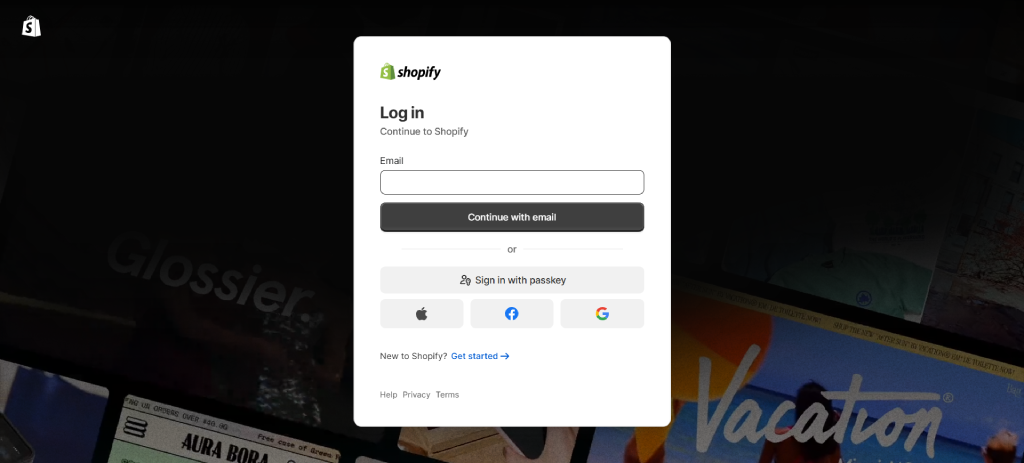
Go to the Shopify website and start the free trial. Enter your email, create a password, and choose your store name. Don’t overthink the onboarding questions; you can change almost everything later.
This is the real starting point of how to build a Shopify store in 2026.
No hosting setup.
No technical configuration.
Just access to a full ecommerce dashboard within minutes.
Step 2: Choose the right Shopify plan
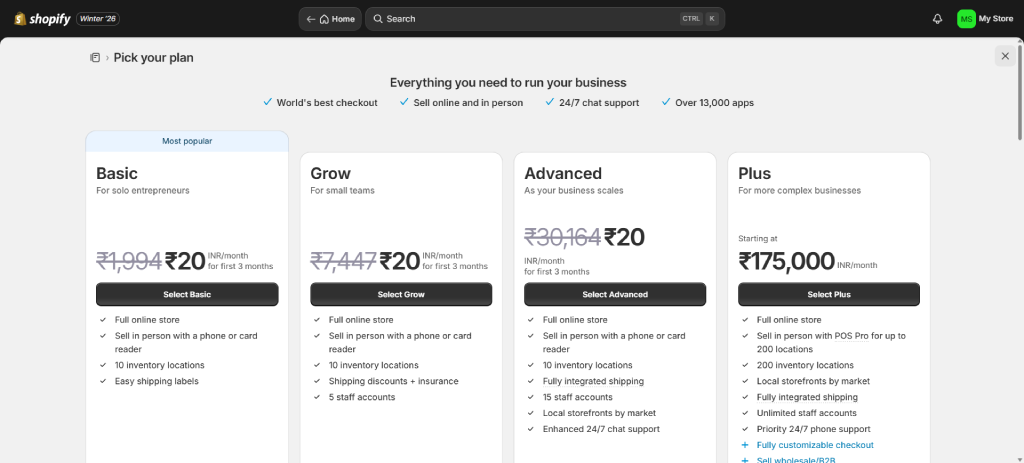
Inside your admin panel, go to Settings → Plan.
Most new founders should start with the Basic plan. In my experience, upgrading too early only increases costs without adding real value. Move to higher plans only when:
- Your traffic grows consistently
- You need advanced reporting or automation
- You’re expanding into B2B or subscriptions
This approach keeps your Shopify store setup guide lean and scalable.
Step 3: Select and customize a theme
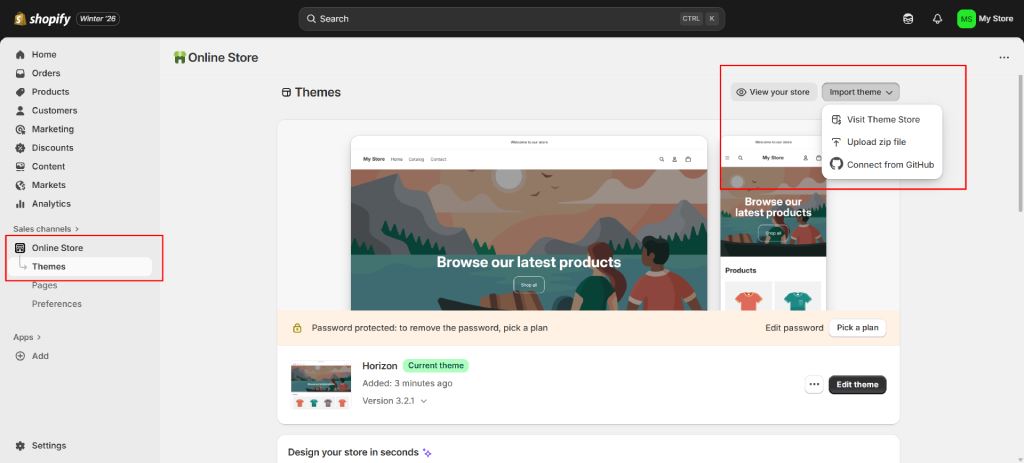
Navigate to Online Store → Themes → Theme Store.
Choose a clean, fast theme and then customize it using Shopify’s editor. A proper Shopify theme customization guide focuses on:
- Mobile-first layouts (most traffic is mobile)
- Clear product grids and spacing
- Fast loading over heavy design effects
If done correctly, this step also acts as a practical Shopify store design tutorial, helping you build trust before a visitor even scrolls.
Step 4: Design a conversion-focused store structure
Go to Online Store → Navigation and set up your menus.
A proven structure that converts well:
Homepage → Collections → Product → Checkout
Avoid clutter. Avoid too many dropdowns.
Simple structures convert faster, especially if you want to know how to launch a Shopify store fast without confusing users.
Step 5: Add products, variants, and collections
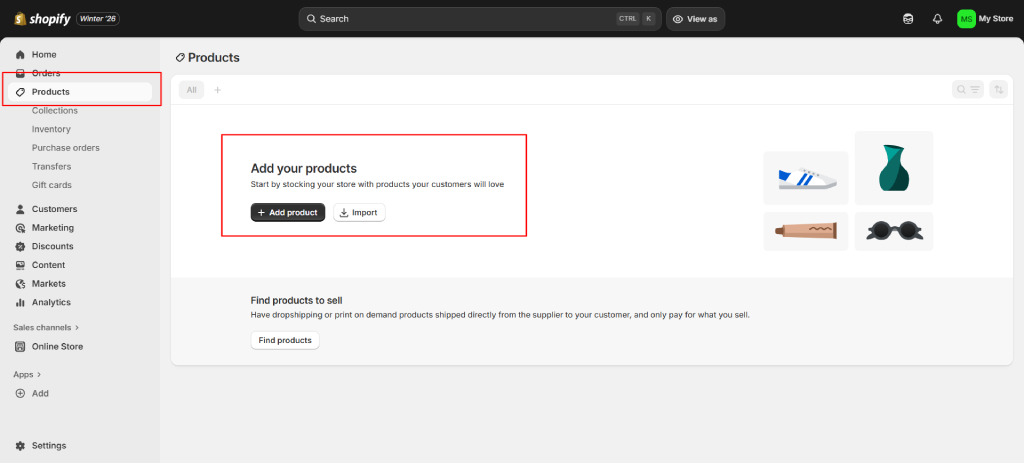
Go to Products → Add product.
Follow a clean Shopify product upload tutorial approach:
- Write SEO-friendly product titles and descriptions
- Add size, color, or pack variants clearly
- Upload optimized images (clear, not oversized)
Well-organized products make future scaling easier and directly support long-term Shopify inventory management tutorial workflows.
Step 6: Set up payments, taxes, and shipping
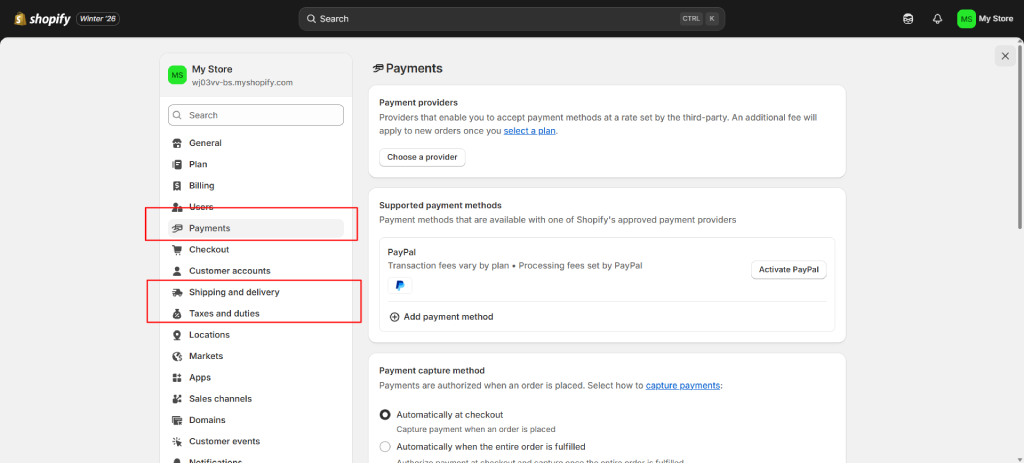
Navigate to Settings → Payments, Taxes, and Shipping.
For a reliable Shopify payment gateway setup:
- Enable Shopify Payments
- Add PayPal or Stripe as alternatives
- Review tax settings based on your selling region
Incorrect payment or tax settings are one of the most common reasons stores lose trust at checkout.
Step 7: Configure checkout, policies, and notifications
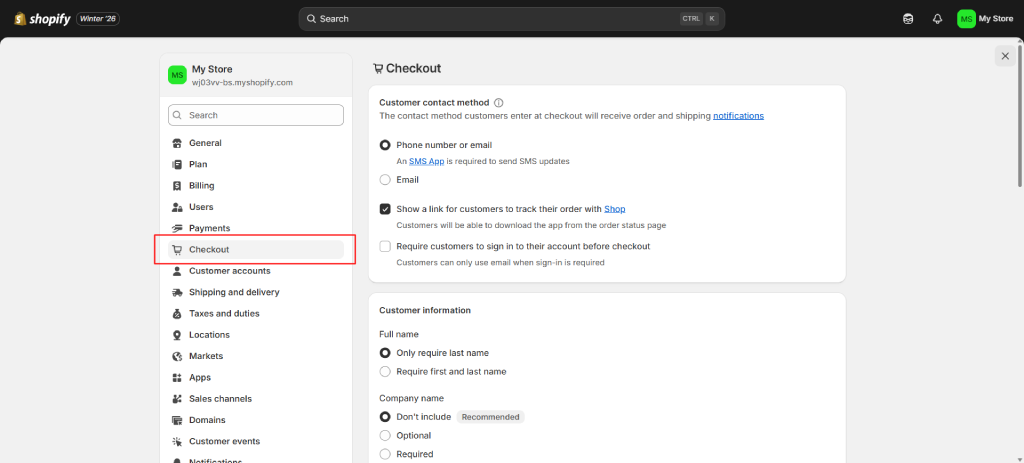
Go to Settings → Checkout and Settings → Policies.
Use Shopify checkout customization carefully—don’t add unnecessary steps or distractions.
Make sure you add:
- Shipping policy
- Refund & return policy
- Order confirmation and shipping emails
These elements quietly build trust and reduce support queries later.
Step 8: Install essential Shopify apps
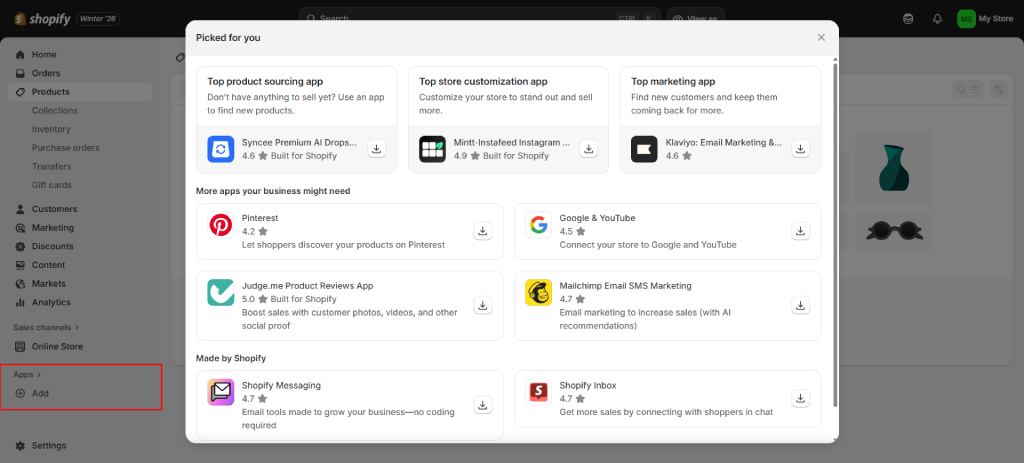
Open Apps → Shopify App Store.
A focused Shopify app installation guide usually includes:
- Product reviews
- Email marketing
- Speed optimization
- SEO tools
Install only what you need. Too many apps slow down your Shopify store and complicate maintenance.
Step 9: Enable core Shopify features
Before adding more tools, use Shopify’s built-in features:
- Order tracking
- Stock alerts
- Discount codes and promotions
This strengthens your Shopify inventory management tutorial setup while keeping costs and complexity low.
Step 10: Set up Shopify seo
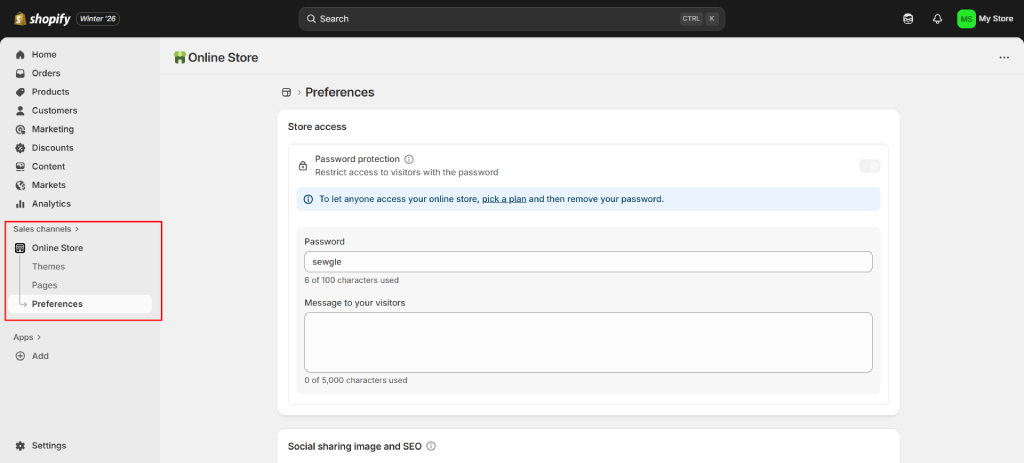
Go to Online Store → Preferences and individual product or page settings.
A basic Shopify SEO setup tutorial includes:
- Optimized meta titles and descriptions
- Clean, readable URLs
- Image alt text
- Blog setup if content marketing is part of your plan
SEO is what allows Shopify stores to grow beyond paid ads over time.
Step 11: Marketing, email & recovery automation
Inside Marketing and Settings → Notifications, configure:
- Shopify abandoned cart setup
- Shopify email marketing integration
When done correctly, these automations recover lost sales and build long-term customer relationships with minimal effort.
Step 12: Test, optimize, and launch
Before launch, test everything:
- Place a test order
- Check emails on mobile and desktop
- Review checkout flow
- Test loading speed
Once ready, remove the password from
Online Store → Preferences and officially set up a Shopify online store for real customers.
Alphaklick is recognized among the top Shopify development companies in India, trusted by brands looking for scalable and performance-focused ecommerce solutions.
How much does it cost to build an ecommerce website using Shopify?
When people search for how to build a Shopify store, cost is usually one of the biggest concerns. The advantage of Shopify is transparent pricing, especially when compared with a traditional Shopify vs WooCommerce store setup.
At the platform level, Shopify manages hosting, security, checkout, and scalability. Your overall cost to create a Shopify ecommerce website depends on how advanced your setup is and which features you choose to implement.
This makes Shopify suitable for founders following a Shopify store setup guide or even a free Shopify store setup guide while planning budgets.
| Build type | Typical cost range | What this setup includes |
| Basic Shopify store setup | $1,000 – $2,000 | Store setup, theme configuration, product upload, payment setup |
| Custom Shopify store design | $2,500 – $4,000 | Custom layout, structured collections, SEO-ready pages |
| Advanced Shopify ecommerce website | $4,000 – $7,000+ | Automation, complex catalogs, and advanced checkout flows |
| Shopify dropshipping store | $1,500 – $3,000 | Supplier-ready setup, product automation, fast launch |
| Shopify Plus / B2B setup | $6,000 – $10,000+ | Wholesale pricing, customer groups, and advanced workflows |
These ranges reflect what it typically costs to build a Shopify website step by step, whether you’re launching a Shopify store from scratch or expanding an existing setup.
Ongoing Shopify store costs to plan for
Even after you set up a Shopify online store, there are ongoing expenses that should be considered:
| Cost item | Typical range |
| Shopify monthly plan | $29–$79/month |
| Premium theme (optional) | $200–$300 (one-time) |
| Apps (email, reviews, SEO) | $50–$200/month |
| Domain name | $10–$20/year |
Many founders keep costs low at the start and scale gradually as revenue grows, which is one of the key reasons Shopify works well for anyone learning how to start a Shopify store through a structured Shopify website tutorial.
While the steps remain the same globally, the Shopify store setup cost in India can vary based on customization and features.
Why choose Alphaklick for Shopify ecommerce website development
Building a Shopify store is easy.
Building a Shopify store that sells consistently, scales smoothly, and doesn’t need rebuilding in six months, that’s where Alphaklick makes the difference.
At Alphaklick, we don’t just launch stores, we design Shopify ecosystems that are ready for traffic, marketing, and growth from day one. Every decision, from structure to speed to SEO, is made with one question in mind: Will this help the business grow?
As a trusted Shopify development company, we work closely with founders to keep things clear and practical. No over-engineering, no cluttered setups, just a clean, scalable Shopify store built around your business goals, whether you’re launching from scratch or upgrading an existing store.
Let’s turn your Shopify idea into a growth-ready store
Book a free consultation and get a clear roadmap for building a Shopify store that’s designed to convert, scale, and last.
Frequently asked questions
Question 1: Can I build a Shopify store without coding?
Answer: Yes. You can build a Shopify store no coding by using Shopify themes, built-in settings, and apps. Shopify handles hosting, security, and checkout, so you don’t need technical knowledge to launch a functional and professional store.
Question 2: Is Shopify good for beginners?
Answer: Absolutely. Shopify is one of the best platforms for beginners because of its intuitive dashboard, guided setup, and strong documentation. A structured Shopify for beginners tutorial makes it easy to learn and launch without feeling overwhelmed.
Question 3: How fast can I launch a Shopify store?
Answer: With a clear plan and the right setup, you can how to launch Shopify store fast, often within 3 to 7 days. Basic stores can go live even quickly if products, content, and branding are ready in advance.
Question 4: Is Shopify good for dropshipping and fashion brands?
Answer: Yes. Shopify works exceptionally well for both dropshipping and fashion brands. I’ve personally built multiple Shopify stores for fashion/dropshipping models using Shopify’s product variants, theme flexibility, and app ecosystem to support fast launches and scaling.
Question 5: Is Shopify better than WooCommerce?
Answer: For most founders, yes. The Shopify vs WooCommerce store setup comparison usually comes down to simplicity versus control. Shopify offers faster setup, better reliability, and lower maintenance, while WooCommerce requires more technical management.